logo responsive
/

Xray Ultimate Minecraft Texture Pack

26.2, 26.1.2, 1.21.11, 1.20.5, 1.19.4, 1.18.2, 1.17.1, 1.16.5

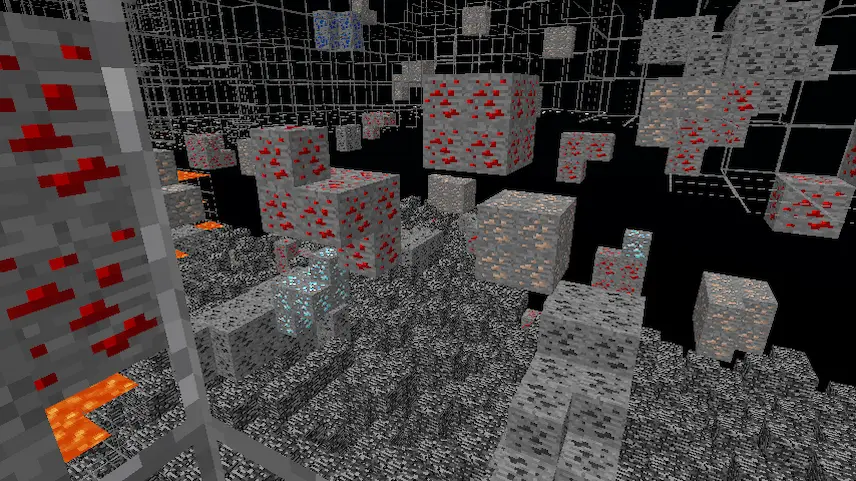
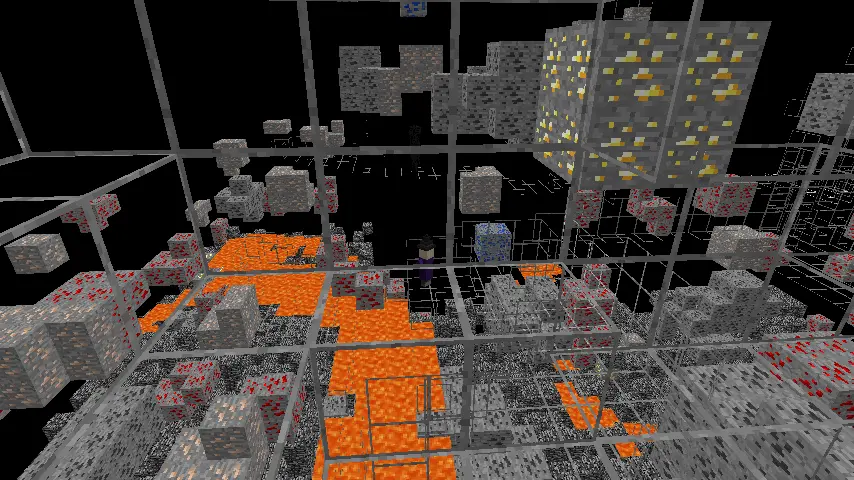
xray texture texture only on ores
xray texture
texture only on ores

The Night Vision resource pack is a must-have for Minecraft players who want to enhance their gameplay experience. This pack makes it easy to spot hidden ores and mineral blocks, which are clearly highlighted, allowing for efficient mining and exploration. To fully utilize this pack, it’s recommended to install Optifine for an extra night vision effect, ensuring that you can see even in the darkest caves. Additionally, turning off smooth lighting will help maintain visibility of those precious ores as you venture through the depths of your world.

One unique feature of this pack is the red square placed on monster blocks, like silverfish blocks, which helps you identify potential threats. The texture is derived from the redstone block, making it compatible with most texture packs. However, if you’re using a pack with a non-standard redstone texture, the square may not stand out as clearly. I encourage you to download the Night Vision resource pack today and transform your Minecraft experience—explore dark caves with confidence and uncover all the hidden treasures waiting for you!
Fabric

  1. 1. Download, execute the Fabric installer, choose Client, select your Minecraft version, and click Install.
  2. 2. Download the Fabric API matching that Minecraft version.
  3. 3. Download Xray Ultimate or any additional Fabric-compatible mods you want.
  4. 4. Place the Fabric API and all mods into .minecraft/mods folder.
  5. 5. Open the Minecraft Launcher, select the new Fabric profile, and press Play. Enjoy!

Forge

  1. 1. Download, execute the Forge installer, choose Client, and click Install.
  2. 3. Download Xray Ultimate or any additional Forge-compatible mods you want.
  3. 4. Place all mods into .minecraft/mods folder.
  4. 5. Open the Minecraft Launcher, select the new Forge profile, and press Play. Enjoy!

NeoForge

  1. 1. Download, execute the NeoForge installer, choose Client, and click Install.
  2. 3. Download Xray Ultimate or any additional NeoForge-compatible mods you want.
  3. 4. Place all mods into .minecraft/mods folder.
  4. 5. Open the Minecraft Launcher, select the new NeoForge profile, and press Play. Enjoy!

Download Xray Ultimate Texture Pack

Type Game version File version Loaders Download
R Release
26.2 v5.4.2 File
R Release
26.1.x v5.4.2 File
R Release
1.21.x v5.4.2 File
R Release
1.20.x v5.2.2 File
R Release
1.19.x v5.0.0 File
R Release
1.18.x v5.0.0 File
R Release
1.17.x v5.0.0 File
R Release
1.16.x v5.0.0 File

Xray Ultimate Minecraft Texture Pack

8 files • 26.2, 26.1.2, 1.21.11, 1.20.5, 1.19.4, 1.18.2, 1.17.1, 1.16.5

Download