logo responsive
/

BetterF3 Minecraft Mod

1.21.11, 1.20.6, 1.19.4, 1.18.2, 1.16.5

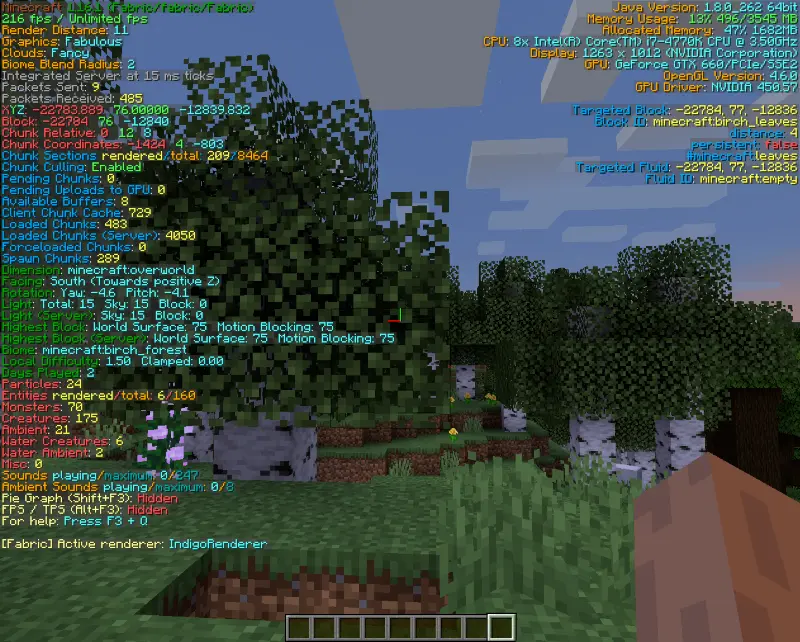
new f3 menu

BetterF3 Mod transforms Minecraft’s clunky debug screen into a sleek, user-friendly dashboard packed with the info you need—minus the chaos! Tired of squinting at jumbled numbers? This mod lets you customize colors, rearrange stats, add spacers, and prioritize data like FPS, coordinates, or biome details. Whether you’re tweaking builds, optimizing performance, or just curious about your world’s secrets, BetterF3 serves up clarity with style.

I’ve been using this mod to clean up my screen during intense survival sessions, and it’s life-changing. The drag-and-drop interface makes organizing stats a breeze, and the color-coded sections help me spot critical info at a glance.


Fabric

  1. 1. Download, execute the Fabric installer, choose Client, select your Minecraft version, and click Install.
  2. 2. Download the Fabric API matching that Minecraft version.
  3. 3. Download BetterF3 or any additional Fabric-compatible mods you want.
  4. 4. Place the Fabric API and all mods into .minecraft/mods folder.
  5. 5. Open the Minecraft Launcher, select the new Fabric profile, and press Play. Enjoy!

Forge

  1. 1. Download, execute the Forge installer, choose Client, and click Install.
  2. 3. Download BetterF3 or any additional Forge-compatible mods you want.
  3. 4. Place all mods into .minecraft/mods folder.
  4. 5. Open the Minecraft Launcher, select the new Forge profile, and press Play. Enjoy!

NeoForge

  1. 1. Download, execute the NeoForge installer, choose Client, and click Install.
  2. 3. Download BetterF3 or any additional NeoForge-compatible mods you want.
  3. 4. Place all mods into .minecraft/mods folder.
  4. 5. Open the Minecraft Launcher, select the new NeoForge profile, and press Play. Enjoy!

Download BetterF3 Mod

Type Game version File version Loaders Download
R Release
1.21.11 v17.0.0
Fabric
File
R Release
1.21.11 v17.0.0
NeoForge
File
R Release
1.21.10 v16.0.3 File
R Release
1.21.10 v16.0.3 File
R Release
1.21.8 v15.0.0
Fabric
File
B Beta
1.21.8 v15.0.0
NeoForge
File
R Release
1.21.7 v15.0.0
Fabric
File
B Beta
1.21.7 v15.0.0
NeoForge
File
R Release
1.21.6 v15.0.0
Fabric
File
B Beta
1.21.6 v15.0.0
NeoForge
File
R Release
1.21.5 v14.0.0
Fabric
File
B Beta
1.21.5 v14.0.0
NeoForge
File
R Release
1.21.4 v13.0.0
Fabric
File
B Beta
1.21.4 v13.0.0
NeoForge
File
R Release
1.21.3 v12.0.0
Fabric
File
B Beta
1.21.3 v12.0.0
NeoForge
File
R Release
1.21.1 v11.0.3
Fabric
File
B Beta
1.21.1 v11.0.3
Forge
File
B Beta
1.21.1 v11.0.3
NeoForge
File
R Release
1.20.6 v10.0.3
Fabric
File
B Beta
1.20.6 v10.0.3
NeoForge
File
R Release
1.20.4 v9.0.2
Fabric
File
B Beta
1.20.4 v9.0.2
Forge
File
B Beta
1.20.4 v9.0.2
NeoForge
File
R Release
1.20.1 v7.0.2
Fabric
File
B Beta
1.20.1 v7.0.2
Forge
File
R Release
1.19.4 v6.0.3
Fabric
File
B Beta
1.19.4 v6.0.3
Forge
File
R Release
1.19.2 v4.0.1
Fabric
File
B Beta
1.19.2 v4.0.1
Forge
File
R Release
1.18.2 v3.0.0
Fabric
File
B Beta
1.18.2 v3.0.0
Forge
File
R Release
1.17.1 v2.0.0
Fabric
File
B Beta
1.17.1 v2.0.0
Forge
File
R Release
1.16.5 v1.5.0
Fabric
File
B Beta
1.16.5 v1.5.0
Forge
File

BetterF3 Minecraft Mod

36 files • 1.21.11, 1.20.6, 1.19.4, 1.18.2, 1.16.5

Download