logo responsive
/

[ETF] Entity Texture Features Minecraft Mod

26.2, 26.1.2, 1.21.11, 1.20.6, 1.19.4, 1.18.2, 1.16.5

skins models skins features 2 skins features 1
skins models
skins features 2
skins features 1

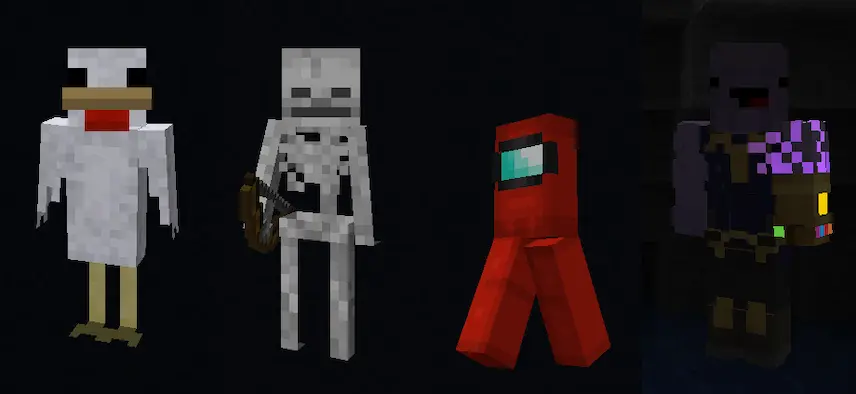
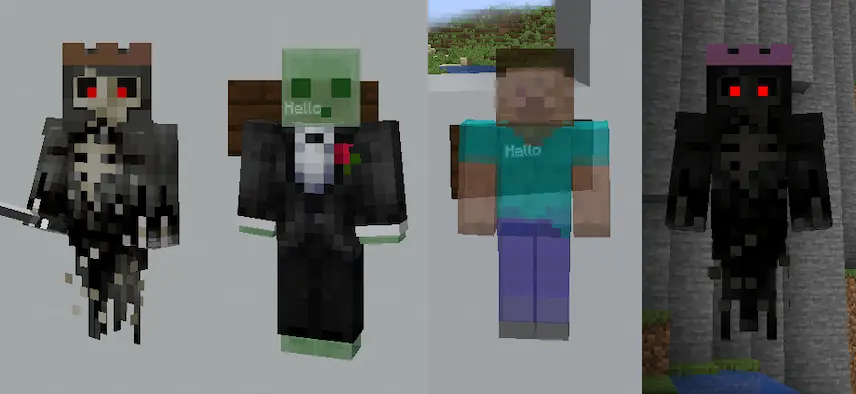
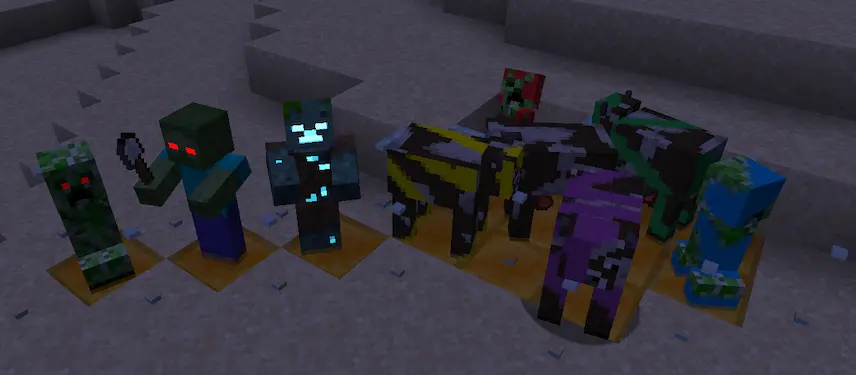
[ETF] Entity Texture Features is a Minecraft mod for Fabric that brings a variety of new entity texture features, including enhanced player skin capabilities and custom entity textures. Designed to provide OptiFine parity on Fabric, ETF allows players to use OptiFine-style resource packs without needing OptiFine itself. It’s perfect for those who want to enjoy OptiFine-like features while using Fabric mods like Sodium and Iris Shaders.

Key Features:

  • Custom & random entity textures using the OptiFine format, with additional properties.
  • Emissive/glowing textures for entities.
  • Blinking mobs for added realism.
  • Player skin enhancements for more customization.

Compatibility:

  • Fully compatible with OptiFine resource packs, Entity Model Features (EMF), and dorianpb’s CEM mod.
  • Works seamlessly with Sodium and Iris Shaders (support varies by shader).
  • Supports mod-added entities if they use vanilla rendering code.

For more OptiFine-like features on Fabric, check out Fabulously Optimized, a modpack that includes ETF and other parity mods.

Fabric

  1. 1. Download, execute the Fabric installer, choose Client, select your Minecraft version, and click Install.
  2. 2. Download the Fabric API matching that Minecraft version.
  3. 3. Download [ETF] Entity Texture Features or any additional Fabric-compatible mods you want.
  4. 4. Place the Fabric API and all mods into .minecraft/mods folder.
  5. 5. Open the Minecraft Launcher, select the new Fabric profile, and press Play. Enjoy!

Forge

  1. 1. Download, execute the Forge installer, choose Client, and click Install.
  2. 3. Download [ETF] Entity Texture Features or any additional Forge-compatible mods you want.
  3. 4. Place all mods into .minecraft/mods folder.
  4. 5. Open the Minecraft Launcher, select the new Forge profile, and press Play. Enjoy!

NeoForge

  1. 1. Download, execute the NeoForge installer, choose Client, and click Install.
  2. 3. Download [ETF] Entity Texture Features or any additional NeoForge-compatible mods you want.
  3. 4. Place all mods into .minecraft/mods folder.
  4. 5. Open the Minecraft Launcher, select the new NeoForge profile, and press Play. Enjoy!

Download [ETF] Entity Texture Features Mod

Type Game version File version Loaders Download
R Release
26.2 v7.1.1
Fabric
File
R Release
26.2 v7.1.1
NeoForge
File
R Release
26.1.x v7.1
Fabric
File
R Release
26.1.x v7.1
NeoForge
File
R Release
1.21.11 v7.1
Fabric
File
R Release
1.21.11 v7.1
Forge
File
R Release
1.21.11 v7.1
NeoForge
File
R Release
1.21.10 v7.1
Fabric
File
R Release
1.21.10 v7.1
Forge
File
R Release
1.21.10 v7.1
NeoForge
File
R Release
1.21.9 v7.1
Fabric
File
R Release
1.21.9 v7.1
Forge
File
R Release
1.21.9 v7.1
NeoForge
File
R Release
1.21.8 v7.1
Fabric
File
R Release
1.21.8 v7.1
Forge
File
R Release
1.21.8 v7.1
NeoForge
File
R Release
1.21.5 v7.1
Fabric
File
R Release
1.21.5 v7.1
Forge
File
R Release
1.21.5 v7.1
NeoForge
File
R Release
1.21.4 v7.1
Fabric
File
R Release
1.21.4 v7.1
Forge
File
R Release
1.21.4 v7.1
NeoForge
File
R Release
1.21.1 v7.1
Fabric
File
R Release
1.21.1 v7.1
Forge
File
R Release
1.21.1 v7.1
NeoForge
File
R Release
1.20.6 v7.0.13
Fabric
File
R Release
1.20.6 v7.0.13
Forge
File
R Release
1.20.6 v7.0.13
NeoForge
File
R Release
1.20.4 v7.0.13
Fabric
File
R Release
1.20.4 v7.0.13
Forge
File
R Release
1.20.4 v7.0.13
NeoForge
File
R Release
1.20.1 v7.1
Fabric
File
R Release
1.20.1 v7.1
Forge
File
R Release
1.19.4 v6.0.1
Fabric
File
R Release
1.19.4 v6.0.1
Forge
File
R Release
1.19.2 v6.0.1
Fabric
File
R Release
1.19.2 v6.0.1
Forge
File
R Release
1.18.2 v6.0
Fabric
File
R Release
1.18.2 v6.0
Forge
File
R Release
1.17.1 v4.3.1
Fabric
File
R Release
1.17.1 v4.3.1
Forge
File
R Release
1.16.5 v4.3.1
Fabric
File
R Release
1.16.5 v4.3.1
Forge
File

[ETF] Entity Texture Features Minecraft Mod

43 files • 26.2, 26.1.2, 1.21.11, 1.20.6, 1.19.4, 1.18.2, 1.16.5

Download