logo responsive
/

Visual Workbench Minecratft Mod

1.21.11, 1.20.6, 1.19.4, 1.18.2

view items in crafting table

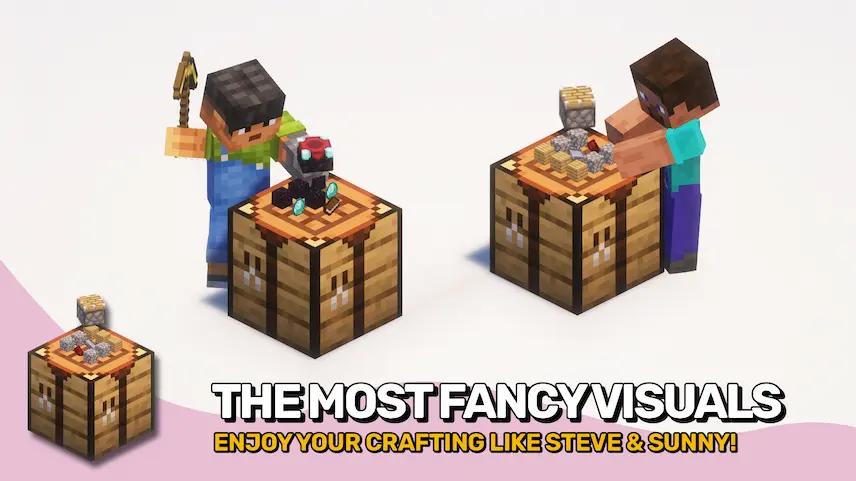
Visual Workbench is a simple but clever Minecraft mod that makes crafting more immersive and practical. With this mod installed, any items you place into a crafting table will stay there instead of disappearing when you close the interface. If you break the table, all the items inside drop just like any normal container, making it much easier to manage your materials during builds or crafting sessions.

One of the best features of this Minecraft mod is the visual rendering of both the ingredients and the crafted item directly on top of the crafting table. This gives your world a more interactive and realistic feel, especially in survival mode or modded builds where visual detail matters. It’s a small change, but one that can really improve the way you interact with crafting in Minecraft.


Fabric

  1. 1. Download, execute the Fabric installer, choose Client, select your Minecraft version, and click Install.
  2. 2. Download the Fabric API matching that Minecraft version.
  3. 3. Download Visual Workbench Minecratft Mod or any additional Fabric-compatible mods you want.
  4. 4. Place the Fabric API and all mods into .minecraft/mods folder.
  5. 5. Open the Minecraft Launcher, select the new Fabric profile, and press Play. Enjoy!

Forge

  1. 1. Download, execute the Forge installer, choose Client, and click Install.
  2. 3. Download Visual Workbench Minecratft Mod or any additional Forge-compatible mods you want.
  3. 4. Place all mods into .minecraft/mods folder.
  4. 5. Open the Minecraft Launcher, select the new Forge profile, and press Play. Enjoy!

NeoForge

  1. 1. Download, execute the NeoForge installer, choose Client, and click Install.
  2. 3. Download Visual Workbench Minecratft Mod or any additional NeoForge-compatible mods you want.
  3. 4. Place all mods into .minecraft/mods folder.
  4. 5. Open the Minecraft Launcher, select the new NeoForge profile, and press Play. Enjoy!

Download Visual Workbench Minecratft Mod

Type Game version File version Loaders Download
R Release
1.21.11 v21.11.1
Fabric
File
R Release
1.21.11 v21.11.1
NeoForge
File
R Release
1.21.10 v21.10.0
Fabric
File
R Release
1.21.10 v21.10.0
NeoForge
File
R Release
1.21.8 v21.8.1
Fabric
File
R Release
1.21.8 v21.8.1
NeoForge
File
R Release
1.21.7 v21.7.0
Fabric
File
R Release
1.21.7 v21.7.0
NeoForge
File
R Release
1.21.6 v21.6.0
Fabric
File
R Release
1.21.6 v21.6.0
NeoForge
File
R Release
1.21.5 v21.5.0
Fabric
File
R Release
1.21.5 v21.5.0
NeoForge
File
R Release
1.21.4 v21.4.1
Fabric
File
R Release
1.21.4 v21.4.1
NeoForge
File
R Release
1.21.1 v21.1.1
Fabric
File
R Release
1.21.1 v21.1.1
NeoForge
File
R Release
1.20.4 v20.4.2
Fabric
File
R Release
1.20.4 v20.4.2
Forge
File
R Release
1.20.4 v20.4.2
NeoForge
File
R Release
1.20.1 v8.0.1
Fabric
File
R Release
1.20.1 v8.0.1
Forge
File
R Release
1.19.4 v6.0.1
Fabric
File
R Release
1.19.4 v6.0.1
Forge
File
R Release
1.19.2 v4.2.4
Fabric
File
R Release
1.19.2 v4.2.4
Forge
File
R Release
1.18.2 v3.3.0
Forge
File
R Release
1.17.1 v2.0.0
Forge
File
R Release
1.16.5 v1.1.0
Forge
File

Visual Workbench Minecratft Mod

28 files • 1.21.11, 1.20.6, 1.19.4, 1.18.2

Download