logo responsive
/

Sodium Minecraft Mod

26.3, 26.2, 26.1.2, 1.21.11

sodium mod performance gameplay
Performance with Sodium

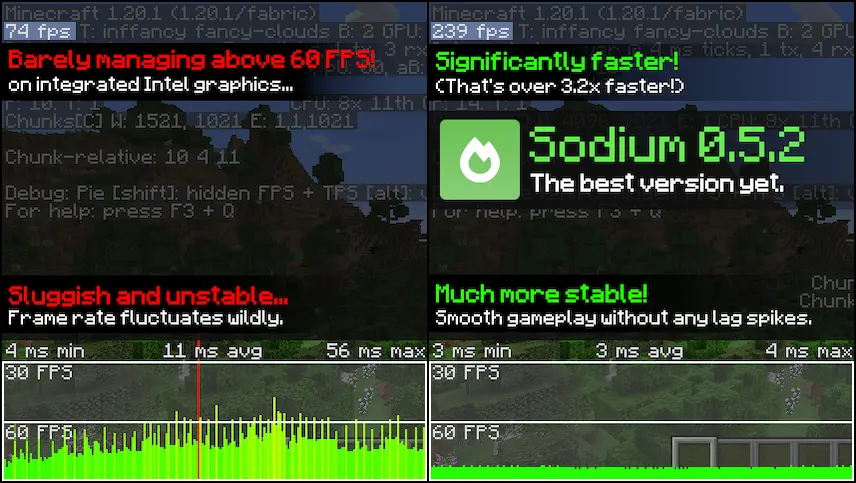
Sodium is a powerful rendering engine and optimization mod for Minecraft that significantly enhances frame rates and reduces micro-stutter, while addressing various graphical issues. This mod is designed to work seamlessly with the Fabric mod ecosystem, making it a great choice for players looking to improve their gaming experience without sacrificing the authentic feel of Minecraft. With Sodium, you can enjoy smoother gameplay and improved visuals, ensuring that your adventures in the blocky world are more enjoyable.

One of the standout features of Sodium is its broad hardware compatibility. It supports graphics cards with up-to-date drivers that are compatible with OpenGL 4.6, including most models released in the past 12 years. This means that players using Intel HD Graphics 500 Series or newer, NVIDIA GeForce 400 Series or newer, and AMD Radeon HD 7000 Series or newer can take advantage of this mod. While older graphics cards may work under certain conditions, they are not officially supported. I encourage you to download Sodium and experience the remarkable improvements it brings to your Minecraft gameplay!


Fabric

  1. 1. Download, execute the Fabric installer, choose Client, select your Minecraft version, and click Install.
  2. 2. Download the Fabric API matching that Minecraft version.
  3. 3. Download Sodium or any additional Fabric-compatible mods you want.
  4. 4. Place the Fabric API and all mods into .minecraft/mods folder.
  5. 5. Open the Minecraft Launcher, select the new Fabric profile, and press Play. Enjoy!

Forge

  1. 1. Download, execute the Forge installer, choose Client, and click Install.
  2. 3. Download Sodium or any additional Forge-compatible mods you want.
  3. 4. Place all mods into .minecraft/mods folder.
  4. 5. Open the Minecraft Launcher, select the new Forge profile, and press Play. Enjoy!

NeoForge

  1. 1. Download, execute the NeoForge installer, choose Client, and click Install.
  2. 3. Download Sodium or any additional NeoForge-compatible mods you want.
  3. 4. Place all mods into .minecraft/mods folder.
  4. 5. Open the Minecraft Launcher, select the new NeoForge profile, and press Play. Enjoy!

Download Sodium Mod

Type Game version File version Loaders Download
R Release
26.3 v0.9.2
Fabric
File
R Release
26.3 v0.9.2
NeoForge
File
R Release
26.2 v0.9.2
Fabric
File
R Release
26.2 v0.9.2
NeoForge
File
R Release
26.1.2 v0.9.2
Fabric
File
R Release
26.1.2 v-0.9.2
NeoForge
File
R Release
1.21.11 v0.8.14
Fabric
File
R Release
1.21.11 v0.8.14
NeoForge
File
R Release
1.21.10 v0.7.3
Fabric
File
R Release
1.21.10 v0.7.3
NeoForge
File
R Release
1.21.8 v-0.7.3
Fabric
File
R Release
1.21.8 v0.7.3
NeoForge
File
B Beta
1.21.5 v0.6.13
Fabric
File
B Beta
1.21.5 v0.6.13
NeoForge
File
R Release
1.21.4 v0.6.13
Fabric
File
R Release
1.21.4 v0.6.13
NeoForge
File
R Release
1.21.1 v0.8.13
Fabric
File
R Release
1.21.1 v0.8.13
NeoForge
File
R Release
1.20.6 v0.5.11
Fabric
File
R Release
1.20.4 v0.5.8
Fabric
File
R Release
1.20.1 v0.5.13
Fabric
File
R Release
1.19.4 v0.4.10
Fabric
File
R Release
1.19.2 v0.4.4
Fabric
File
R Release
1.18.2 v0.4.1
Fabric
File
R Release
1.17.1 v0.3.4
Fabric
File
R Release
1.16.5 v0.2.0
Fabric
File

Sodium Minecraft Mod

26 files • 26.3, 26.2, 26.1.2, 1.21.11

Download