logo responsive
/

Shulker Box Tooltip Minecraft Mod

26.1.2, 1.21.11, 1.20.6, 1.19.4, 1.18.2

Compact Preview Full Preview Configuration Screen
Compact Preview
Full Preview
Configuration Screen

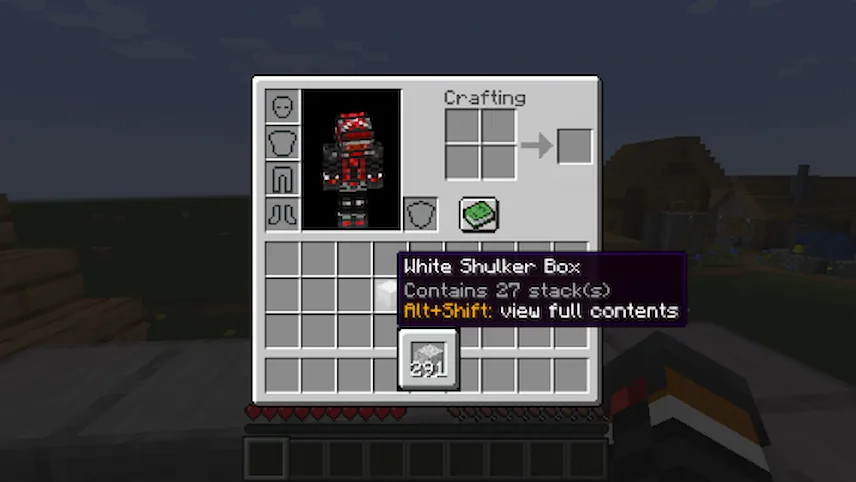
Shulker Box Tooltip mod is one of those “how did I ever live without this?” tools. Instead of having to place down a shulker box every time you forget what’s inside, you can just hover over it in your inventory and press Shift to see a quick preview. It saves a ton of time, especially when you are working on big projects and have dozens of boxes filled with different materials.

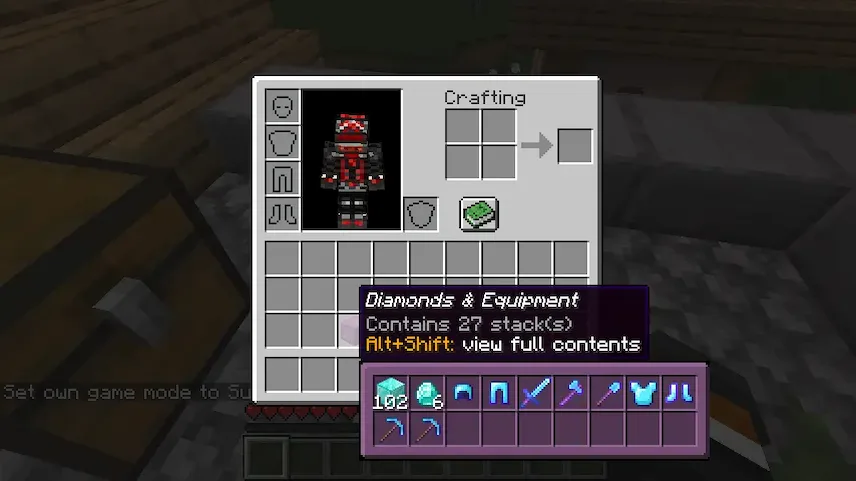
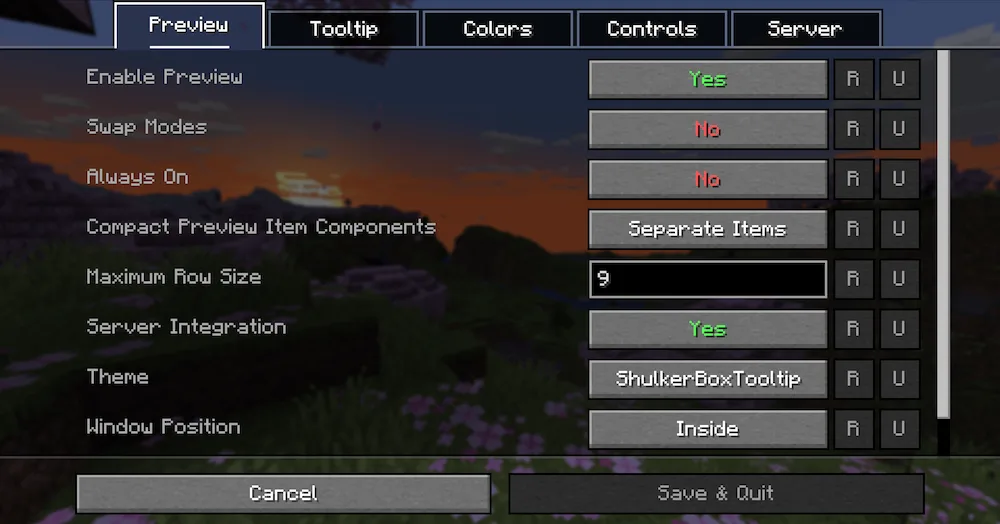
The mod is really smart about how it shows you your items. If you want to see exactly where everything is placed inside the box, you can hold Alt + Shift for a full grid preview. It doesn’t just work for shulker boxes, either—it works for chests, furnaces, and barrels too! The preview window even changes its color to match the color of the shulker box you are looking at, which is a nice touch. You can customize everything, from the colors to the hotkeys, through the in-game config menu.


Fabric

  1. 1. Download, execute the Fabric installer, choose Client, select your Minecraft version, and click Install.
  2. 2. Download the Fabric API matching that Minecraft version.
  3. 3. Download Shulker Box Tooltip or any additional Fabric-compatible mods you want.
  4. 4. Place the Fabric API and all mods into .minecraft/mods folder.
  5. 5. Open the Minecraft Launcher, select the new Fabric profile, and press Play. Enjoy!

Forge

  1. 1. Download, execute the Forge installer, choose Client, and click Install.
  2. 3. Download Shulker Box Tooltip or any additional Forge-compatible mods you want.
  3. 4. Place all mods into .minecraft/mods folder.
  4. 5. Open the Minecraft Launcher, select the new Forge profile, and press Play. Enjoy!

NeoForge

  1. 1. Download, execute the NeoForge installer, choose Client, and click Install.
  2. 3. Download Shulker Box Tooltip or any additional NeoForge-compatible mods you want.
  3. 4. Place all mods into .minecraft/mods folder.
  4. 5. Open the Minecraft Launcher, select the new NeoForge profile, and press Play. Enjoy!

Download Shulker Box Tooltip Mod

Type Game version File version Loaders Download
R Release
26.2 v5.3.1
Fabric
File
R Release
26.2 v5.3.1
NeoForge
File
R Release
26.1.x v5.3.0
Fabric
File
R Release
26.1.x v5.3.0
NeoForge
File
R Release
1.21.11 v5.2.16
Fabric
File
R Release
1.21.11 v5.2.16
Forge
File
R Release
1.21.11 v5.2.16
NeoForge
File
R Release
1.21.10 v5.2.13
Fabric
File
R Release
1.21.10 v5.2.13
Forge
File
R Release
1.21.10 v5.2.13
NeoForge
File
R Release
1.21.8 v5.2.12
Fabric
File
R Release
1.21.8 v5.2.12
Forge
File
R Release
1.21.8 v5.2.12
NeoForge
File
R Release
1.21.5 v5.2.6
Fabric
File
R Release
1.21.5 v5.2.6
Forge
File
R Release
1.21.5 v5.2.6
NeoForge
File
R Release
1.21.4 v5.2.6
Fabric
File
R Release
1.21.4 v5.2.6
Forge
File
R Release
1.21.4 v5.2.6
NeoForge
File
R Release
1.21.1 v5.1.9
Fabric
File
R Release
1.21.1 v5.1.9
Forge
File
R Release
1.21.1 v5.1.9
NeoForge
File
R Release
1.20.6 v4.2.2
Fabric
File
R Release
1.20.6 v4.2.2
Forge
File
R Release
1.20.6 v4.2.2
NeoForge
File
R Release
1.20.4 v4.1.0
Fabric
File
R Release
1.20.4 v4.1.0
Forge
File
R Release
1.20.1 v4.0.4
Fabric
File
R Release
1.20.1 v4.0.4
Forge
File
R Release
1.19.4 v3.4.5
Fabric
File
R Release
1.19.4 v3.4.5
Forge
File
R Release
1.19.2 v3.2.2
Fabric
File
R Release
1.19.2 v3.2.2
Forge
File
R Release
1.18.2 v3.4.6
Fabric
File
R Release
1.18.2 v3.4.6
Forge
File
R Release
1.17.1 v3.0.5
Fabric
File
R Release
1.16.5 v2.3.9
Fabric
File

Shulker Box Tooltip Minecraft Mod

37 files • 26.1.2, 1.21.11, 1.20.6, 1.19.4, 1.18.2

Download