logo responsive
/

Not Enough Animations Minecraft Mod

26.2, 26.1.2, 1.21.11, 1.20.6, 1.19.4, 1.18.2, 1.16.5

Animation Eating/Drinking Animation Horses Animation Boat rowing Animation Maps
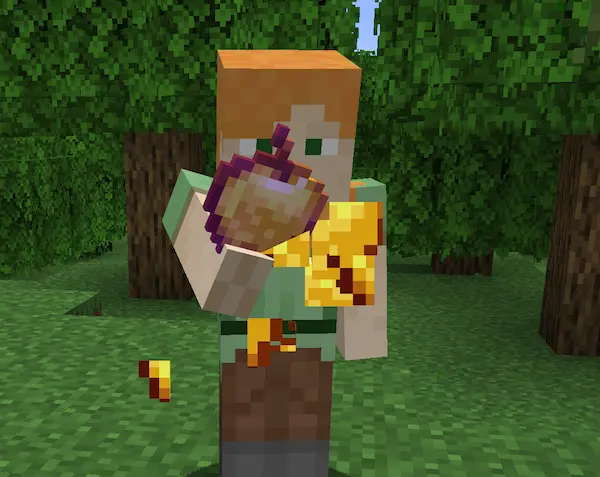
Animation Eating/Drinking
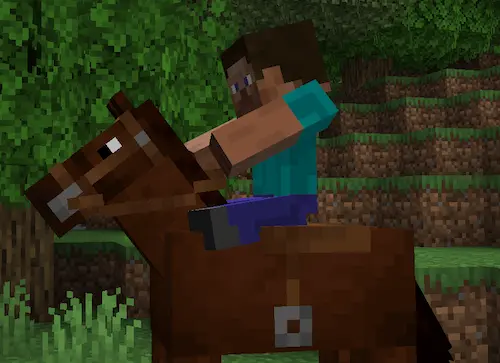
Animation Horses
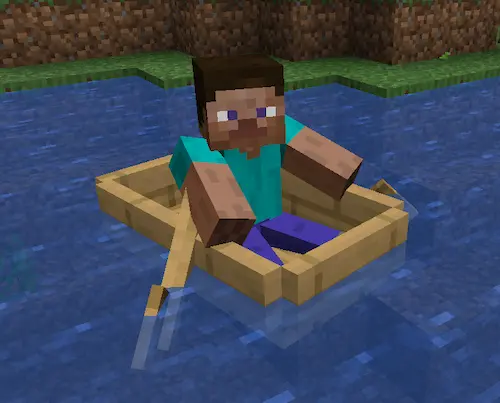
Animation Boat rowing
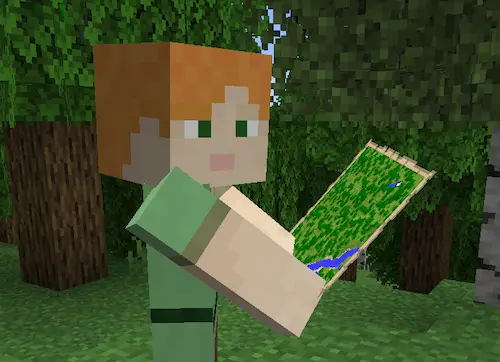
Animation Maps

This mod enhances third-person animations in Minecraft, bringing them closer to the first-person experience or improving them to better reflect how actions should look. Originally created as an expansion for the First-Person Mod, it works perfectly on its own and is fully compatible with vanilla and third-party servers (since it’s purely visual).

Key Features:

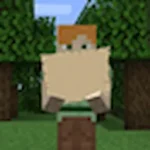
  • Eating/Drinking Animations: More realistic and immersive.

  • Map Viewing: See map content when holding it or viewing it in an item frame.
  • Shield Placement: Body rotates with the head while blocking.
  • Two-Handed Animations: Offhand items are hidden while using bows or crossbows.
  • Boat Rowing: Adds rowing animations instead of static paddles.
  • Horse Riding: Characters now appear to hold the reins.
  • Compass/Clock Viewing: Adds a visual touch, especially useful for the First-Person Mod.
  • Ladder/Climbing Animations: More dynamic and realistic.
  • Crawling Animation: Replaces the swimming animation when out of water.
  • Smooth Arm Movements: Transitions between actions are more fluid.

All features can be enabled or disabled individually via an in-game config screen, accessible through ModList/ModMenu. Ready to make your third-person gameplay more immersive? Download this mod today and enjoy a visually enhanced Minecraft experience!

Fabric

  1. 1. Download, execute the Fabric installer, choose Client, select your Minecraft version, and click Install.
  2. 2. Download the Fabric API matching that Minecraft version.
  3. 3. Download Not Enough Animations or any additional Fabric-compatible mods you want.
  4. 4. Place the Fabric API and all mods into .minecraft/mods folder.
  5. 5. Open the Minecraft Launcher, select the new Fabric profile, and press Play. Enjoy!

Forge

  1. 1. Download, execute the Forge installer, choose Client, and click Install.
  2. 3. Download Not Enough Animations or any additional Forge-compatible mods you want.
  3. 4. Place all mods into .minecraft/mods folder.
  4. 5. Open the Minecraft Launcher, select the new Forge profile, and press Play. Enjoy!

NeoForge

  1. 1. Download, execute the NeoForge installer, choose Client, and click Install.
  2. 3. Download Not Enough Animations or any additional NeoForge-compatible mods you want.
  3. 4. Place all mods into .minecraft/mods folder.
  4. 5. Open the Minecraft Launcher, select the new NeoForge profile, and press Play. Enjoy!

Download Not Enough Animations Mod

Type Game version File version Loaders Download
R Release
26.2 v1.12.4
Fabric
File
R Release
26.1.x v1.12.4
Fabric
File
R Release
26.1.2 v1.12.4
NeoForge
File
R Release
1.21.11 v1.12.4
Fabric
File
R Release
1.21.11 v1.12.4
NeoForge
File
R Release
1.21.10 v1.12.4
Fabric
File
R Release
1.21.10 v1.12.4
Forge
File
R Release
1.21.10 v1.12.4
NeoForge
File
R Release
1.21.8 v1.12.4
Fabric
File
R Release
1.21.8 v1.12.4
Forge
File
R Release
1.21.8 v1.12.4
NeoForge
File
R Release
1.21.7 v1.10.4.1
Fabric
File
R Release
1.21.7 v1.10.1
Forge
File
R Release
1.21.7 v1.10.1
NeoForge
File
R Release
1.21.6 v1.10.1
Fabric
File
R Release
1.21.6 v1.10.1
Forge
File
R Release
1.21.6 v1.10.1
NeoForge
File
R Release
1.21.5 v1.12.4
Fabric
File
R Release
1.21.5 v1.12.4
Forge
File
R Release
1.21.5 v1.12.4
NeoForge
File
R Release
1.21.4 v1.12.4
Fabric
File
R Release
1.21.4 v1.12.4
Forge
File
R Release
1.21.4 v1.12.4
NeoForge
File
R Release
1.21.3 v1.12.4
Fabric
File
R Release
1.21.3 v1.12.4
Forge
File
R Release
1.21.3 v1.12.4
NeoForge
File
R Release
1.21.1 v1.12.4
Fabric
File
R Release
1.21.1 v1.12.4
Forge
File
R Release
1.21.1 v1.12.4
NeoForge
File
R Release
1.20.6 v1.10.1
Fabric
File
R Release
1.20.6 v1.10.1
Forge
File
R Release
1.20.6 v1.10.1
NeoForge
File
R Release
1.20.4 v1.11.1
Fabric
File
R Release
1.20.4 v1.11.1
Forge
File
R Release
1.20.4 v1.11.1
NeoForge
File
R Release
1.20.1 v1.12.4
Fabric
File
R Release
1.20.1 v1.12.4
Forge
File
R Release
1.19.4 v1.10.1
Fabric
File
R Release
1.19.4 v1.10.1
Forge
File
R Release
1.19.2 v1.11.1
Fabric
File
R Release
1.19.2 v1.11.1
Forge
File
R Release
1.18.2 v1.11.1
Fabric
File
R Release
1.18.2 v1.11.1
Forge
File
R Release
1.17.1 v1.9.2
Fabric
File
B Beta
1.17.1 v1.9.2
Forge
File
R Release
1.16.5 v1.10.1
Fabric
File
B Beta
1.16.5 v1.9.2
Forge
File

Not Enough Animations Minecraft Mod

47 files • 26.2, 26.1.2, 1.21.11, 1.20.6, 1.19.4, 1.18.2, 1.16.5

Download