logo responsive
/

Neat Minecraft Mod

1.21.6, 1.20.1, 1.19.4, 1.18.2, 1.16.5

healt bar

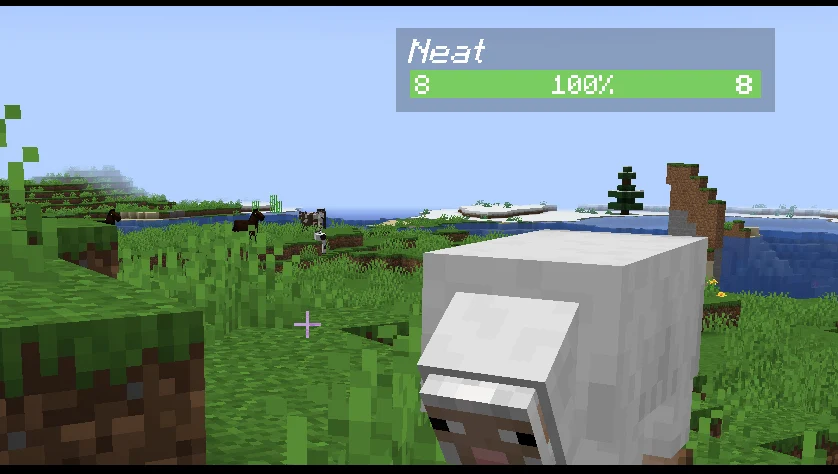
Neat is a Minecraft mod that adds clean and simple unit frames above every entity, giving you quick access to useful information. With this mod, you can see the name, health, and armor of mobs or players, making battles and exploration much easier. The health bar changes color depending on how much health the mob has, shifting from green to yellow to red. Since it is fully client sided, it runs smoothly without affecting the server, and health bars only appear when the mob is visible and not blocked by terrain.

The mod also includes several extra features to make gameplay more convenient. It shows attributes like Smite or Bane of Arthropods, groups health bars for stacked mobs, and even works with Minecraft’s scoreboard teams by displaying colored names. Neat is highly configurable, allowing you to adjust settings and even toggle health bars with a keybind. For players who want a clearer view of combat and mob details, this Minecraft mod is a simple but powerful way to improve the game.


Fabric

  1. 1. Download, execute the Fabric installer, choose Client, select your Minecraft version, and click Install.
  2. 2. Download the Fabric API matching that Minecraft version.
  3. 3. Download Neat or any additional Fabric-compatible mods you want.
  4. 4. Place the Fabric API and all mods into .minecraft/mods folder.
  5. 5. Open the Minecraft Launcher, select the new Fabric profile, and press Play. Enjoy!

Forge

  1. 1. Download, execute the Forge installer, choose Client, and click Install.
  2. 3. Download Neat or any additional Forge-compatible mods you want.
  3. 4. Place all mods into .minecraft/mods folder.
  4. 5. Open the Minecraft Launcher, select the new Forge profile, and press Play. Enjoy!

NeoForge

  1. 1. Download, execute the NeoForge installer, choose Client, and click Install.
  2. 3. Download Neat or any additional NeoForge-compatible mods you want.
  3. 4. Place all mods into .minecraft/mods folder.
  4. 5. Open the Minecraft Launcher, select the new NeoForge profile, and press Play. Enjoy!

Download Neat Mod

Type Game version File version Loaders Download
R Release
1.21.6
NeoForge
File
R Release
1.21.5
NeoForge
File
R Release
1.21.4
NeoForge
File
R Release
1.21.1
NeoForge
File
R Release
1.20.1
Forge
File
R Release
1.19.4
Forge
File
R Release
1.19.2
Forge
File
R Release
1.18.2
Forge
File
R Release
1.16.5
Forge
File
R Release
1.12.2
Forge
File

Neat Minecraft Mod

10 files • 1.21.6, 1.20.1, 1.19.4, 1.18.2, 1.16.5

Download