logo responsive
/

Fantastic Wings Minecraft Mod

26.2, 26.1.2, 1.21.11, 1.20.4

Wings

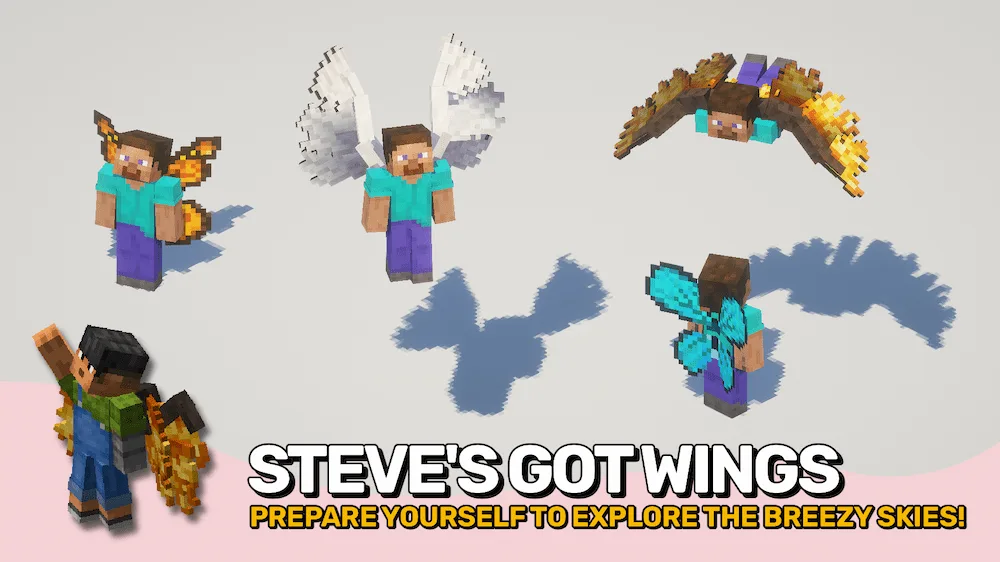
If you have ever wanted to ditch the Elytra for something more natural, Fantastic Wings mod is a perfect choice. Instead of just wearing a cape, you actually grow your own set of wings by brewing and drinking a special potion. You can choose between different styles, like bird-style avian wings or colorful insect ones. The best part is the animation; the wings flutter, fold, and stretch naturally as you walk or fly, which makes the whole experience feel way more immersive and magical than the standard game.

Flying with this mod is super smooth and easy to get used to. You just toggle your flight key to get moving, using the jump and crouch keys to go up or down. If you decide to stop flying mid-air, you don’t have to worry about a crash landing because you will just drift safely to the ground. If you ever get tired of your wings, you can just drink some bottled bat blood to remove them and go back to normal. It is a great way to add some style and freedom to your next adventure.


Fabric

  1. 1. Download, execute the Fabric installer, choose Client, select your Minecraft version, and click Install.
  2. 2. Download the Fabric API matching that Minecraft version.
  3. 3. Download Fantastic Wings or any additional Fabric-compatible mods you want.
  4. 4. Place the Fabric API and all mods into .minecraft/mods folder.
  5. 5. Open the Minecraft Launcher, select the new Fabric profile, and press Play. Enjoy!

Forge

  1. 1. Download, execute the Forge installer, choose Client, and click Install.
  2. 3. Download Fantastic Wings or any additional Forge-compatible mods you want.
  3. 4. Place all mods into .minecraft/mods folder.
  4. 5. Open the Minecraft Launcher, select the new Forge profile, and press Play. Enjoy!

NeoForge

  1. 1. Download, execute the NeoForge installer, choose Client, and click Install.
  2. 3. Download Fantastic Wings or any additional NeoForge-compatible mods you want.
  3. 4. Place all mods into .minecraft/mods folder.
  4. 5. Open the Minecraft Launcher, select the new NeoForge profile, and press Play. Enjoy!

Download Fantastic Wings Mod

Type Game version File version Loaders Download
R Release
26.2 v26.2.0
Fabric
File
R Release
26.2 v26.2.0
NeoForge
File
R Release
26.1.2 v26.1.2
Fabric
File
R Release
26.1.2 v26.1.2
NeoForge
File
R Release
1.21.11 v21.11.1
Fabric
File
R Release
1.21.11 v21.11.1
NeoForge
File
R Release
1.21.10 v21.10.0
Fabric
File
R Release
1.21.10 v21.10.0
NeoForge
File
R Release
1.21.8 v21.8.0
Fabric
File
R Release
1.21.8 v21.8.0
NeoForge
File
R Release
1.21.5 v21.5.0
Fabric
File
R Release
1.21.5 v21.5.0
NeoForge
File
R Release
1.21.4 v21.4.1
Fabric
File
R Release
1.21.4 v21.4.1
NeoForge
File
R Release
1.21.1 v21.1.2
Fabric
File
R Release
1.21.1 v21.1.2
NeoForge
File
R Release
1.20.4 v20.4.0
Fabric
File
R Release
1.20.4 v20.4.0
Forge
File
R Release
1.20.4 v20.4.0
NeoForge
File
R Release
1.20.1 v20.1.1
Fabric
File
R Release
1.20.1 v20.1.1
Forge
File

Fantastic Wings Minecraft Mod

21 files • 26.2, 26.1.2, 1.21.11, 1.20.4

Download