logo responsive
/

Cubes Without Borders Minecraft Mod

26.2, 26.1.2, 1.21.11, 1.20.6, 1.19.4, 1.18.2

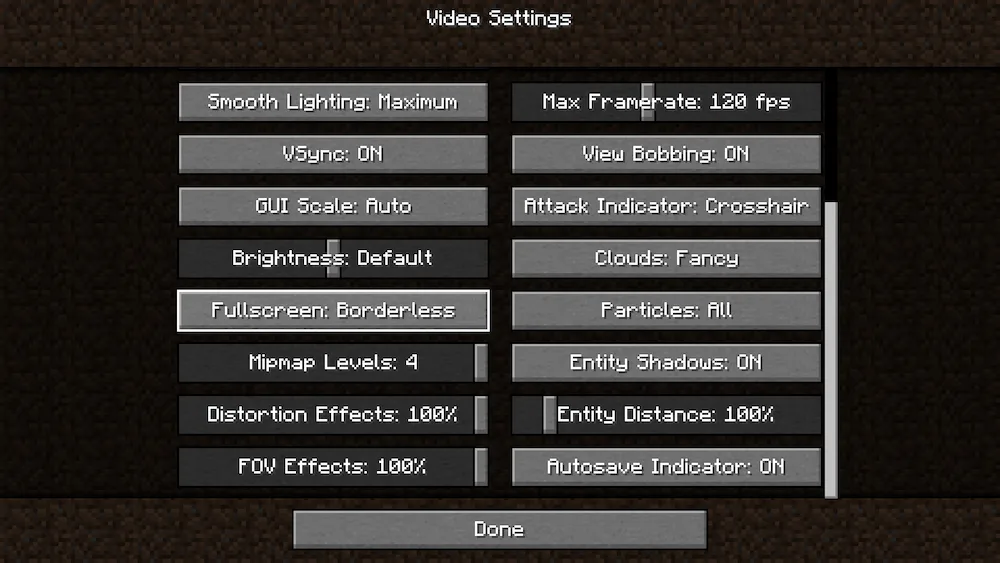
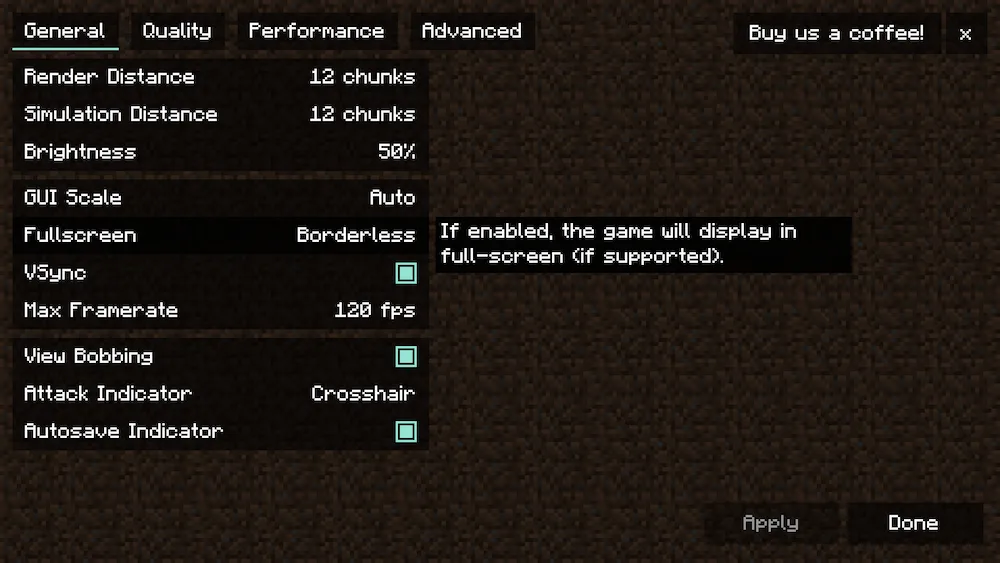
Video Settings Video Settings with Sodium mod Mod Settings
Video Settings
Video Settings with Sodium mod
Mod Settings

Cubes Without Borders mod lets you play Minecraft in a smooth, borderless fullscreen window. This simple yet huge quality-of-life feature means you can keep the game open and running in the background while you interact with other applications on a second monitor, or even right on top of the game window itself.

What makes this mod stand out is its dedicated support for every major platform, including Linux, macOS, and Windows. Unlike other borderless mods that often break on different operating systems, this project aims to give everyone the best possible experience right out of the box. You get seamless gameplay with no screen flickering, no weird glitches, and you don’t even lose the ability to change your game’s resolution. To activate it, just head to your Video Settings and switch the Fullscreen setting to the new Borderless option.


Fabric

  1. 1. Download, execute the Fabric installer, choose Client, select your Minecraft version, and click Install.
  2. 2. Download the Fabric API matching that Minecraft version.
  3. 3. Download Cubes Without Borders or any additional Fabric-compatible mods you want.
  4. 4. Place the Fabric API and all mods into .minecraft/mods folder.
  5. 5. Open the Minecraft Launcher, select the new Fabric profile, and press Play. Enjoy!

Forge

  1. 1. Download, execute the Forge installer, choose Client, and click Install.
  2. 3. Download Cubes Without Borders or any additional Forge-compatible mods you want.
  3. 4. Place all mods into .minecraft/mods folder.
  4. 5. Open the Minecraft Launcher, select the new Forge profile, and press Play. Enjoy!

NeoForge

  1. 1. Download, execute the NeoForge installer, choose Client, and click Install.
  2. 3. Download Cubes Without Borders or any additional NeoForge-compatible mods you want.
  3. 4. Place all mods into .minecraft/mods folder.
  4. 5. Open the Minecraft Launcher, select the new NeoForge profile, and press Play. Enjoy!

Download Cubes Without Borders Mod

Type Game version File version Loaders Download
R Release
26.2 v4.1.0
Forge Fabric NeoForge
File
R Release
26.1.x v4.1.0
Forge Fabric NeoForge
File
R Release
1.21.11 v3.0.0
Fabric
File
R Release
1.21.11 v3.0.0
NeoForge
File
R Release
1.21.10 v3.0.0
Fabric
File
R Release
1.21.8 v3.0.0
Fabric
File
R Release
1.21.8 v3.0.0
NeoForge
File
R Release
1.21.5 v3.0.0
Fabric
File
R Release
1.21.5 v3.0.0
NeoForge
File
R Release
1.21.4 v3.0.0
Fabric
File
R Release
1.21.4 v3.0.0
Forge
File
R Release
1.21.4 v3.0.0
NeoForge
File
R Release
1.21.1 v3.0.0
Fabric
File
R Release
1.21.1 v3.0.0
Forge
File
R Release
1.21.1 v3.0.0
NeoForge
File
R Release
1.20.6 v3.0.0
Fabric
File
R Release
1.20.6 v3.0.0
Forge
File
R Release
1.20.6 v3.0.0
NeoForge
File
R Release
1.20.4 v3.0.0
Fabric
File
R Release
1.20.4 v3.0.0
Forge
File
R Release
1.20.1 v3.0.0
Fabric
File
R Release
1.20.1 v3.0.0
Forge
File
R Release
1.19.4 v3.0.0
Fabric
File
R Release
1.19.4 v3.0.0
Forge
File
R Release
1.19.2 v3.0.0
Fabric
File
R Release
1.19.2 v3.0.0
Forge
File
R Release
1.18.2 v3.0.0
Fabric
File
R Release
1.18.2 v3.0.0
Forge
File
R Release
1.17.1 v3.0.0
Fabric
File
R Release
1.17.1 v3.0.0
Forge
File
R Release
1.16.5 v3.0.0
Fabric
File
R Release
1.16.5 v3.0.0
Forge
File

Cubes Without Borders Minecraft Mod

32 files • 26.2, 26.1.2, 1.21.11, 1.20.6, 1.19.4, 1.18.2

Download