logo responsive
/

Cloud Boots Minecraft Mod

1.21.11, 1.20.6, 1.19.4, 1.18.2

all items Golden Feather Cloud Boots
all items
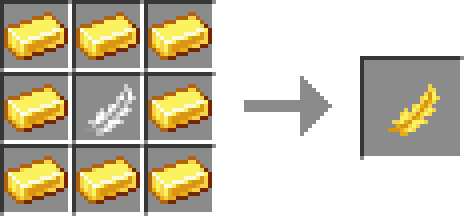
Golden Feather
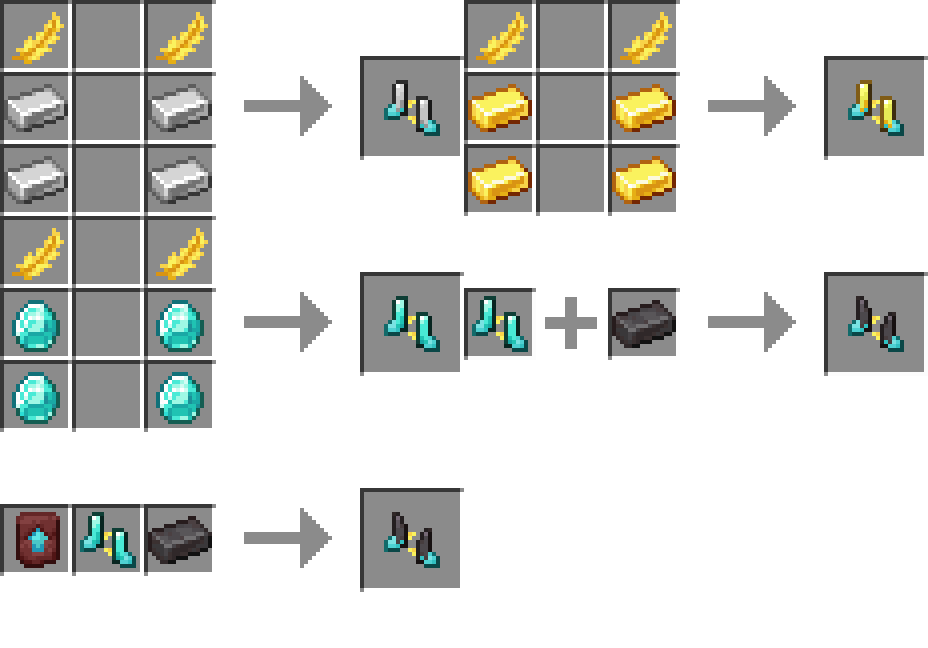
Cloud Boots

If you are tired of taking fall damage every time you miss a jump, the Cloud Boots mod is going to be your new best friend. This mod adds a series of special boots that make moving around your world feel way more fluid and fun. Depending on the material you use, from basic iron all the way up to netherite, you get a massive boost to both your movement speed and your jump height. It’s perfect for scaling tall mountains or just getting across biomes in half the time it usually takes.

The best part about these boots is that they give you total immunity to fall damage, so you can leap off the highest cliffs without a second thought. As you upgrade your gear, the stats get even crazier; for example, the Netherite Cloud Boots give you a 20% speed increase and Jump Boost V. It feels a bit like having a permanent potion effect without the annoying particles or time limits. Whether you are exploring new lands or just building a massive tower, these boots make the whole experience much faster and safer.


Fabric

  1. 1. Download, execute the Fabric installer, choose Client, select your Minecraft version, and click Install.
  2. 2. Download the Fabric API matching that Minecraft version.
  3. 3. Download Cloud Boots or any additional Fabric-compatible mods you want.
  4. 4. Place the Fabric API and all mods into .minecraft/mods folder.
  5. 5. Open the Minecraft Launcher, select the new Fabric profile, and press Play. Enjoy!

Forge

  1. 1. Download, execute the Forge installer, choose Client, and click Install.
  2. 3. Download Cloud Boots or any additional Forge-compatible mods you want.
  3. 4. Place all mods into .minecraft/mods folder.
  4. 5. Open the Minecraft Launcher, select the new Forge profile, and press Play. Enjoy!

NeoForge

  1. 1. Download, execute the NeoForge installer, choose Client, and click Install.
  2. 3. Download Cloud Boots or any additional NeoForge-compatible mods you want.
  3. 4. Place all mods into .minecraft/mods folder.
  4. 5. Open the Minecraft Launcher, select the new NeoForge profile, and press Play. Enjoy!

Download Cloud Boots Mod

Type Game version File version Loaders Download
R Release
1.21.11 v3.0.2
Fabric
File
R Release
1.21.11 v3.0.2
NeoForge
File
R Release
1.21.8 v3.0.2
Fabric
File
R Release
1.21.8 v3.0.2
NeoForge
File
R Release
1.21.5 v3.0.2
Fabric
File
R Release
1.21.5 v3.0.2
NeoForge
File
R Release
1.21.1 v3.0.2
Fabric
File
R Release
1.21.1 v3.0.2
NeoForge
File
R Release
1.20.1 v3.0.2
Fabric
File
R Release
1.20.1 v3.0.2
Forge
File
R Release
1.19.4 v3.0.0
Fabric
File
R Release
1.19.4 3.0.0
Forge
File
R Release
1.19.2 v2.2.1
Fabric
File
R Release
1.19.2 v2.2.1
Forge
File
R Release
1.18.2 v3.0.0
Fabric
File
R Release
1.18.2 v3.0.0
Forge
File
R Release
1.17.1 v3.0.0
Fabric
File
R Release
1.17.1 v3.0.0
Forge
File
R Release
1.16.5 v3.0.0
Fabric
File
R Release
1.16.5 v3.0.0
Forge
File

Cloud Boots Minecraft Mod

20 files • 1.21.11, 1.20.6, 1.19.4, 1.18.2

Download