logo responsive
/

PaperDoll Minecraft Mod

1.21.8, 1.20.6, 1.19.4, 1.18.2, 1.16.5

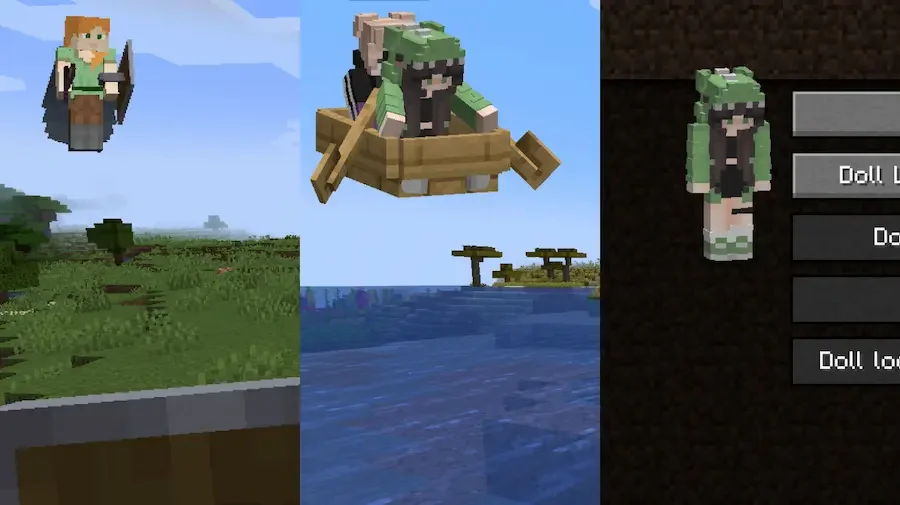
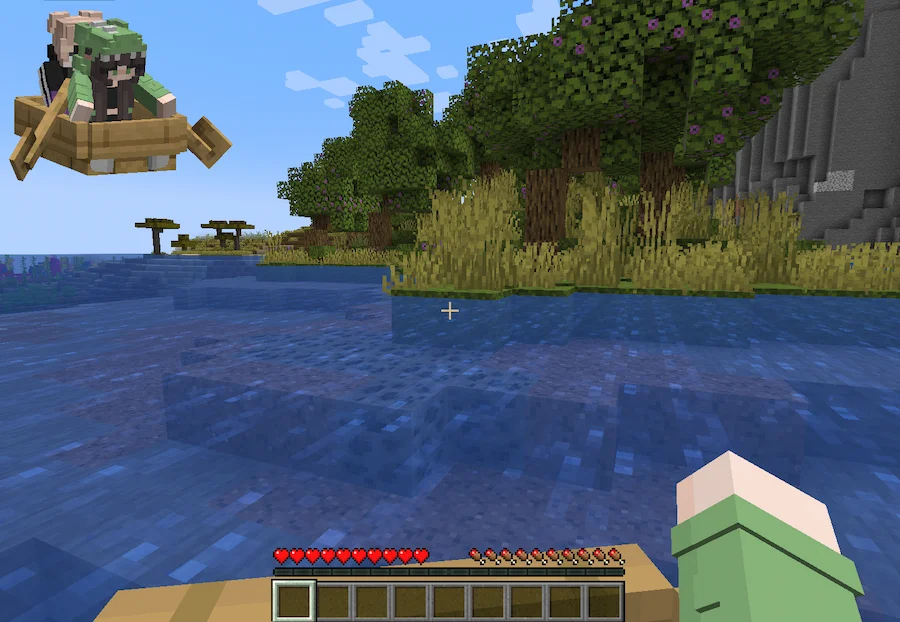
Paperdoll Examples Boat Paperdoll
Paperdoll Examples
Boat Paperdoll

PaperDoll is a client side Minecraft mod that brings the popular Bedrock style Paperdoll feature into the game’s UI. It adds a small, customizable model of your character that appears on-screen, making your gameplay feel more immersive and giving you a clearer sense of how you look in the world. The mod is designed to be feature rich, with support for a wide range of scenarios including spectating other entities and even showing vehicles like boats along with their passengers.

One of the biggest strengths of this Minecraft mod is its high level of customization. You can freely place and scale the Paperdoll on your screen, control when it appears through configurable visibility logic, and even set different behaviors depending on your actions. It also works seamlessly with other popular mods such as Essential, Wavey Capes, and 3D Skin Layers, ensuring a smooth experience. For players who want more personality and immersion in their UI, PaperDoll is a simple yet powerful way to enhance the game.


Fabric

  1. 1. Download, execute the Fabric installer, choose Client, select your Minecraft version, and click Install.
  2. 2. Download the Fabric API matching that Minecraft version.
  3. 3. Download PaperDoll or any additional Fabric-compatible mods you want.
  4. 4. Place the Fabric API and all mods into .minecraft/mods folder.
  5. 5. Open the Minecraft Launcher, select the new Fabric profile, and press Play. Enjoy!

Forge

  1. 1. Download, execute the Forge installer, choose Client, and click Install.
  2. 3. Download PaperDoll or any additional Forge-compatible mods you want.
  3. 4. Place all mods into .minecraft/mods folder.
  4. 5. Open the Minecraft Launcher, select the new Forge profile, and press Play. Enjoy!

NeoForge

  1. 1. Download, execute the NeoForge installer, choose Client, and click Install.
  2. 3. Download PaperDoll or any additional NeoForge-compatible mods you want.
  3. 4. Place all mods into .minecraft/mods folder.
  4. 5. Open the Minecraft Launcher, select the new NeoForge profile, and press Play. Enjoy!

Download PaperDoll Mod

Type Game version File version Loaders Download
R Release
1.21.8 v1.3.1
Fabric
File
R Release
1.21.8 v1.3.1
Forge
File
R Release
1.21.7 v1.3.1
Fabric
File
R Release
1.21.7 v1.3.1
Forge
File
R Release
1.21.6 v1.3.1
Fabric
File
R Release
1.21.6 v1.3.1
Forge
File
R Release
1.21.5 v1.3.1
Fabric
File
R Release
1.21.5 v1.3.1
Forge
File
R Release
1.21.5 v1.3.1
NeoForge
File
R Release
1.21.4 v1.3.1
Fabric
File
R Release
1.21.4 v1.3.1
Forge
File
R Release
1.21.4 v1.3.1
NeoForge
File
R Release
1.21.1 v1.3.1
Fabric
File
R Release
1.21.1 v1.3.1
Forge
File
R Release
1.21.1 v1.3.1
NeoForge
File
R Release
1.20.6 v1.3.1
Fabric
File
R Release
1.20.6 v1.3.1
Forge
File
R Release
1.20.6 v1.3.1
NeoForge
File
R Release
1.20.4 v1.3.1
Fabric
File
R Release
1.20.4 v1.3.1
Forge
File
R Release
1.20.4 v1.3.1
NeoForge
File
R Release
1.20.1 v1.3.1
Fabric
File
R Release
1.20.1 v1.3.1
Forge
File
R Release
1.19.4 v1.3.1
Fabric
File
R Release
1.19.4 v1.3.1
Forge
File
R Release
1.19.2 v1.3.1
Fabric
File
R Release
1.19.2 v1.3.1
Forge
File
R Release
1.18.2 v1.3.1
Fabric
File
R Release
1.18.2 v1.3.1
Forge
File
R Release
1.17.1 v1.2.7
Fabric
File
B Beta
1.17.1 v1.2.7
Forge
File
R Release
1.16.5 v1.3.1
Fabric
File
B Beta
1.16.5 v1.2.7
Forge
File

PaperDoll Minecraft Mod

33 files • 1.21.8, 1.20.6, 1.19.4, 1.18.2, 1.16.5

Download