logo responsive
/

Better Third Person Minecraft Mod

1.21.8, 1.20.6, 1.19.4, 1.18.2

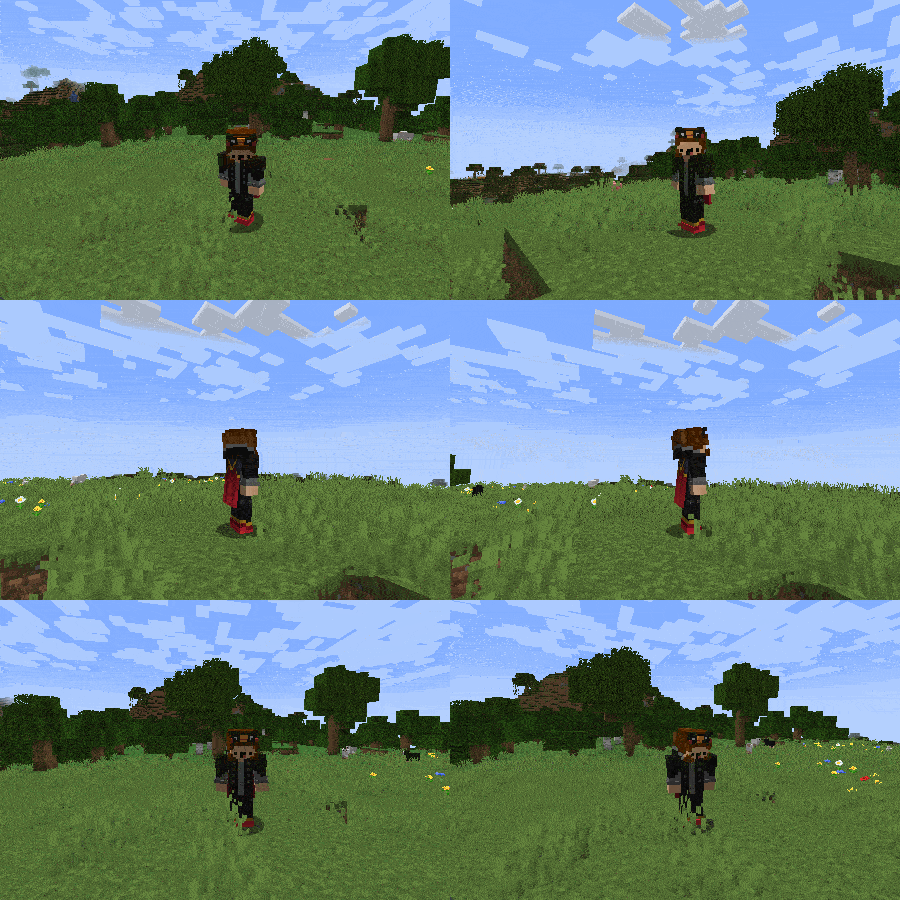
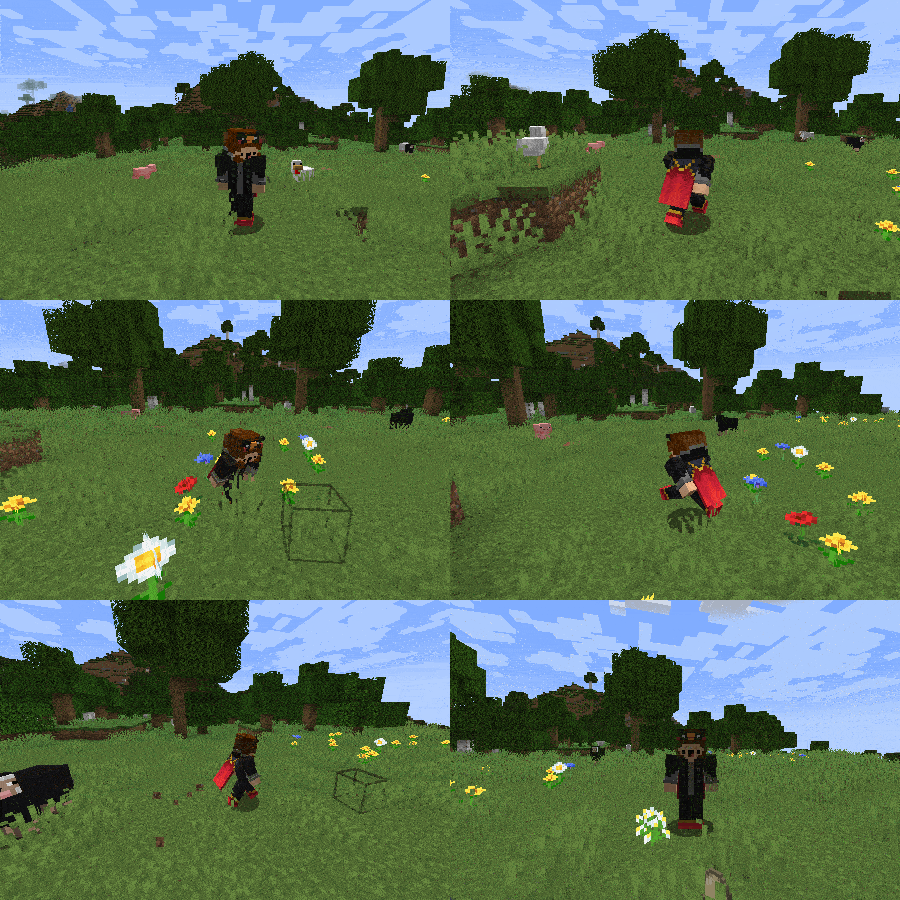
Allows you to freely rotate camera for 360 degrees Allows you to walk in 8 directions without changing camera rotation
Allows you to freely rotate camera for 360 degrees
Allows you to walk in 8 directions without changing camera rotation

Better Third Person Mod adds a full third person camera rotation system, giving you complete control over your point of view while exploring, building, or fighting. It lets you rotate the camera 360 degrees without changing the direction your character is facing, allowing for smoother and more immersive gameplay. Whether you’re walking in one direction while looking in another, or just admiring your surroundings, this mod makes the third person view feel much more natural.

The mod works entirely on the client side and does not require any special permissions or server changes. You can still place blocks, break items, use tools, and interact with the world as usual while using the free camera. It also supports riding animals like horses and pigs, swimming, and flying with elytra, so it fits right into any style of gameplay. If you’re looking for a Minecraft mod that improves camera movement in third person, this is a great option for a better and more flexible experience.

Fabric

  1. 1. Download, execute the Fabric installer, choose Client, select your Minecraft version, and click Install.
  2. 2. Download the Fabric API matching that Minecraft version.
  3. 3. Download Better Third Person or any additional Fabric-compatible mods you want.
  4. 4. Place the Fabric API and all mods into .minecraft/mods folder.
  5. 5. Open the Minecraft Launcher, select the new Fabric profile, and press Play. Enjoy!

Forge

  1. 1. Download, execute the Forge installer, choose Client, and click Install.
  2. 3. Download Better Third Person or any additional Forge-compatible mods you want.
  3. 4. Place all mods into .minecraft/mods folder.
  4. 5. Open the Minecraft Launcher, select the new Forge profile, and press Play. Enjoy!

NeoForge

  1. 1. Download, execute the NeoForge installer, choose Client, and click Install.
  2. 3. Download Better Third Person or any additional NeoForge-compatible mods you want.
  3. 4. Place all mods into .minecraft/mods folder.
  4. 5. Open the Minecraft Launcher, select the new NeoForge profile, and press Play. Enjoy!

Download Better Third Person Mod

Type Game version File version Loaders Download
B Beta
1.21.8 v1.9.0
Fabric
File
R Release
1.21.8 v1.9.0
NeoForge
File
B Beta
1.21.7 v1.9.0
Fabric
File
R Release
1.21.7 v1.9.0
NeoForge
File
B Beta
1.21.6 v1.9.0
Fabric
File
R Release
1.21.6 v1.9.0
NeoForge
File
B Beta
1.21.5 v1.9.0
Fabric
File
R Release
1.21.5 v1.9.0
NeoForge
File
B Beta
1.21.4 v1.9.0
Fabric
File
R Release
1.21.4 v1.9.0
NeoForge
File
B Beta
1.21.1 v1.9.0
Fabric
File
R Release
1.21.1 v1.9.0
NeoForge
File
B Beta
1.20.4 v1.9.0
Fabric
File
R Release
1.20.4 v1.9.0
Forge
File
B Beta
1.20.1 v1.9.0
Fabric
File
R Release
1.20.1 v1.9.0
Forge
File
B Beta
1.19.4 v1.9.0
Fabric
File
R Release
1.19.4 v1.9.0
Forge
File
B Beta
1.19.2 v1.9.0
Fabric
File
R Release
1.19.2 v1.9.0
Forge
File
B Beta
1.18.2 v1.8.1
Fabric
File
R Release
1.18.2 v1.8.1
Forge
File
B Beta
1.17.1 v1.5.1
Fabric
File
R Release
1.17.1 v1.5.1
Forge
File
B Beta
1.16.5 v1.5.0
Fabric
File
R Release
1.16.5 v1.5.0
Forge
File

Better Third Person Minecraft Mod

26 files • 1.21.8, 1.20.6, 1.19.4, 1.18.2

Download