logo responsive
/

Cloth Config API Minecraft Mod

26.3, 26.2, 26.1.2, 1.21.11

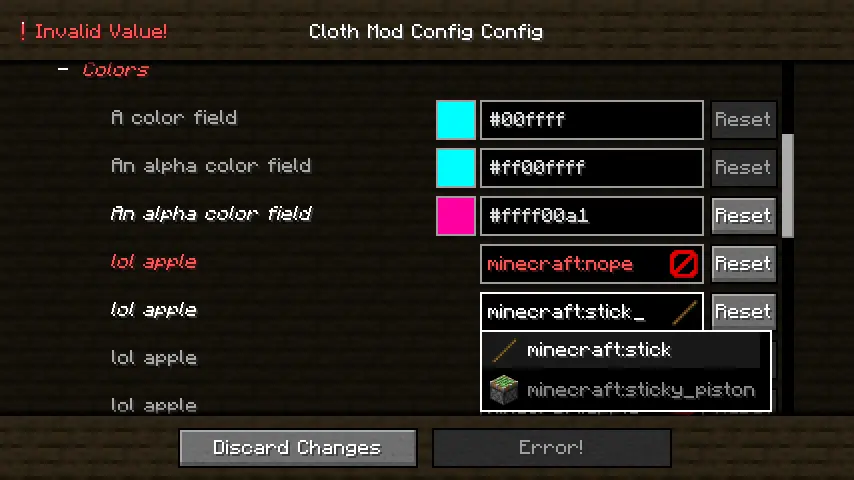
config screen

Cloth Config API is a powerful tool that simplifies the process of creating configuration screens for Minecraft mods. As a developer, I know how challenging it can be to design user-friendly interfaces, and this API provides an intuitive and flexible solution to streamline that process. With Cloth Config, you can easily implement customizable settings for your mods, allowing players to tweak features according to their preferences without diving into complex code or external files. Whether you’re building a new mod or improving an existing one, this API can save you time and enhance the overall user experience.

If you’re looking for a way to make your mod stand out with seamless and attractive configuration options, Cloth Config API is definitely worth exploring. It’s designed to work smoothly with the latest versions of Minecraft and integrates effortlessly with other popular modding tools. Ready to elevate your modding projects? Try Cloth Config API today and create a more interactive and polished experience for your players.

Fabric

  1. 1. Download, execute the Fabric installer, choose Client, select your Minecraft version, and click Install.
  2. 2. Download the Fabric API matching that Minecraft version.
  3. 3. Download Cloth Config API or any additional Fabric-compatible mods you want.
  4. 4. Place the Fabric API and all mods into .minecraft/mods folder.
  5. 5. Open the Minecraft Launcher, select the new Fabric profile, and press Play. Enjoy!

Forge

  1. 1. Download, execute the Forge installer, choose Client, and click Install.
  2. 3. Download Cloth Config API or any additional Forge-compatible mods you want.
  3. 4. Place all mods into .minecraft/mods folder.
  4. 5. Open the Minecraft Launcher, select the new Forge profile, and press Play. Enjoy!

NeoForge

  1. 1. Download, execute the NeoForge installer, choose Client, and click Install.
  2. 3. Download Cloth Config API or any additional NeoForge-compatible mods you want.
  3. 4. Place all mods into .minecraft/mods folder.
  4. 5. Open the Minecraft Launcher, select the new NeoForge profile, and press Play. Enjoy!

Download Cloth Config API Mod

Type Game version File version Loaders Download
R Release
26.3 v26.3.158
Fabric
File
R Release
26.2 v26.2.155
Fabric
File
R Release
26.2 v26.2.155
NeoForge
File
R Release
26.1.2 v26.1.154
Fabric
File
R Release
26.1.2 v26.1.154
NeoForge
File
R Release
1.21.11 v21.11.153
Fabric
File
R Release
1.21.x v15.0.140
Forge
File
R Release
1.21.11 v21.11.153
NeoForge
File
R Release
1.21.10 v20.0.149
Fabric
File
R Release
1.21.10 v20.0.149
NeoForge
File
R Release
1.21.8 v19.0.147
Fabric
File
R Release
1.21.8 v19.0.147
NeoForge
File
R Release
1.21.5 v18.0.145
Fabric
File
R Release
1.21.5 v18.0.145
NeoForge
File
R Release
1.21.4 v17.0.144
Fabric
File
R Release
1.21.4 v17.0.144
NeoForge
File
R Release
1.21.1 v15.0.140
Fabric
File
R Release
1.21.1 v15.0.140
NeoForge
File
R Release
1.20.6 v14.0.139
Fabric
File
R Release
1.20.6 v14.0.139
Forge
File
R Release
1.20.6 v14.0.139
NeoForge
File
R Release
1.20.4 v13.0.138
Fabric
File
R Release
1.20.4 v13.0.138
Forge
File
R Release
1.20.4 v13.0.138
NeoForge
File
R Release
1.20.1 v11.1.13
Fabric
File
R Release
1.20.1 v11.1.136
Forge
File
R Release
1.19.4 v10.1.135
Fabric
File
R Release
1.19.4 v10.1.135
Forge
File
R Release
1.19.2 v8.3.134
Fabric
File
R Release
1.19.2 v8.3.134
Forge
File
R Release
1.18.2 v6.5.102
Fabric
File
R Release
1.18.2 v6.5.102
Forge
File
R Release
1.17.1 v5.3.63
Fabric
File
R Release
1.17.1 v5.3.63
Forge
File
R Release
1.16.5 v4.17.101
Fabric
File
R Release
1.16.5 v4.17.101
Forge
File

Cloth Config API Minecraft Mod

36 files • 26.3, 26.2, 26.1.2, 1.21.11

Download