logo responsive
/

Leaves Be Gone Minecraft Mod

26.2, 26.1.2, 1.21.11, 1.20.6, 1.19.4, 1.18.2

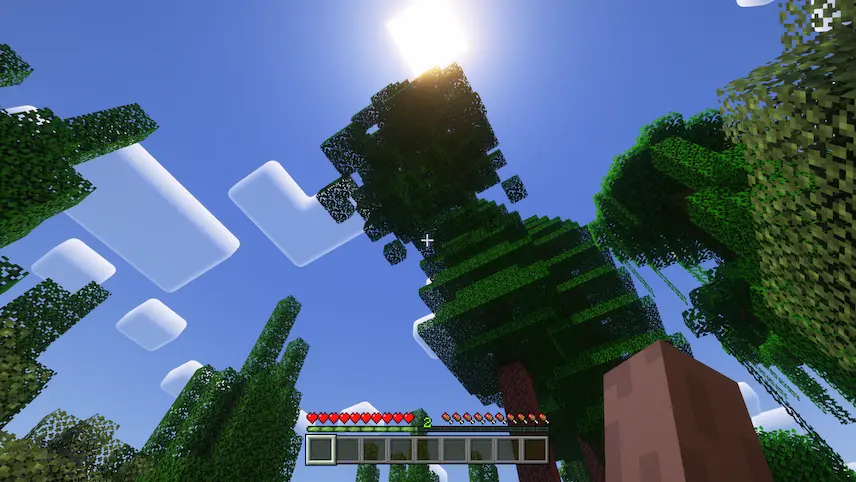
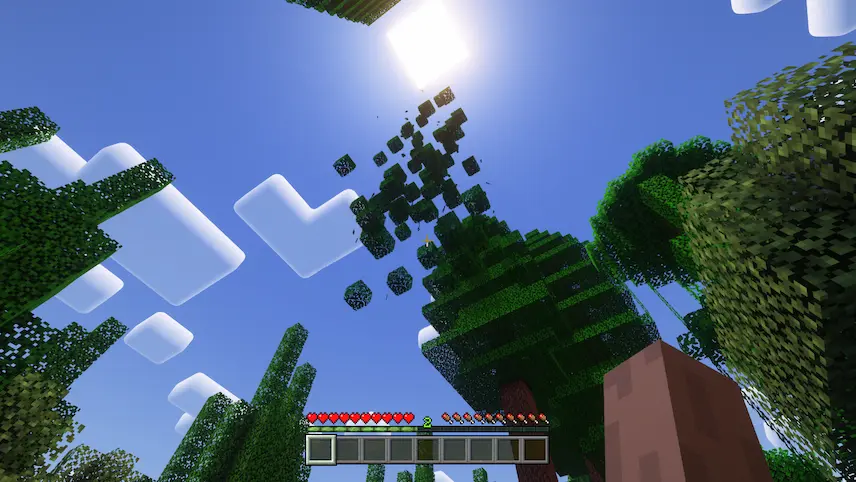
leaves keeps on leaves be gone when remove all wood
leaves keeps on
leaves be gone when remove all wood

Leaves Be Gone is the ultimate solution for Minecraft players tired of waiting hours (or days!) for leaves to disappear after chopping down trees! This mod makes leaves decay instantly—seriously, just one second after you break the last log—so your builds stay clean and your world lag-free. It works flawlessly with any modded leaves (like those from Terrestria or Biomes O’ Plenty) as long as they’re tagged properly, and it’s lightning-fast because it piggybacks on Minecraft’s own decay system instead of adding clunky checks. No more block updates slowing your game or leaves mysteriously lingering after reloading chunks—this mod keeps things tidy, efficient, and frustration-free.


Fabric

  1. 1. Download, execute the Fabric installer, choose Client, select your Minecraft version, and click Install.
  2. 2. Download the Fabric API matching that Minecraft version.
  3. 3. Download Leaves Be Gone or any additional Fabric-compatible mods you want.
  4. 4. Place the Fabric API and all mods into .minecraft/mods folder.
  5. 5. Open the Minecraft Launcher, select the new Fabric profile, and press Play. Enjoy!

Forge

  1. 1. Download, execute the Forge installer, choose Client, and click Install.
  2. 3. Download Leaves Be Gone or any additional Forge-compatible mods you want.
  3. 4. Place all mods into .minecraft/mods folder.
  4. 5. Open the Minecraft Launcher, select the new Forge profile, and press Play. Enjoy!

NeoForge

  1. 1. Download, execute the NeoForge installer, choose Client, and click Install.
  2. 3. Download Leaves Be Gone or any additional NeoForge-compatible mods you want.
  3. 4. Place all mods into .minecraft/mods folder.
  4. 5. Open the Minecraft Launcher, select the new NeoForge profile, and press Play. Enjoy!

Download Leaves Be Gone Mod

Type Game version File version Loaders Download
R Release
26.2 v26.2.0
Fabric
File
R Release
26.2 v26.2.0
NeoForge
File
R Release
26.1.x v26.1.0
Fabric
File
R Release
26.1.x v26.1.0
NeoForge
File
R Release
1.21.11 v21.11.0
Fabric
File
R Release
1.21.11 v21.11.0
NeoForge
File
R Release
1.21.10 v21.10.0
Fabric
File
R Release
1.21.10 v21.10.0
NeoForge
File
R Release
1.21.8 v21.8.0
Fabric
File
R Release
1.21.8 v21.8.0
NeoForge
File
R Release
1.21.5 v21.5.2
Fabric
File
R Release
1.21.5 v21.5.2
NeoForge
File
R Release
1.21.4 v21.4.3
Fabric
File
R Release
1.21.4 v21.4.3
NeoForge
File
R Release
1.21.3 v21.3.1
Fabric
File
R Release
1.21.3 v21.3.1
NeoForge
File
R Release
1.21.1 v21.1.1
Fabric
File
R Release
1.21.1 v21.1.1
NeoForge
File
R Release
1.20.4 v20.4.1
Fabric
File
R Release
1.20.4 v20.4.1
Forge
File
R Release
1.20.4 v20.4.1
NeoForge
File
R Release
1.20.1 v8.0.0
Fabric
File
R Release
1.20.1 v8.0.0
Forge
File
R Release
1.19.4 v6.0.0
Fabric
File
R Release
1.19.4 v6.0.0
Forge
File
R Release
1.19.2 v4.0.1
Fabric
File
R Release
1.19.2 v4.0.1
Forge
File
R Release
1.18.2 v3.0.0
Fabric
File
R Release
1.18.2 v3.0.0
Forge
File

Leaves Be Gone Minecraft Mod

29 files • 26.2, 26.1.2, 1.21.11, 1.20.6, 1.19.4, 1.18.2

Download