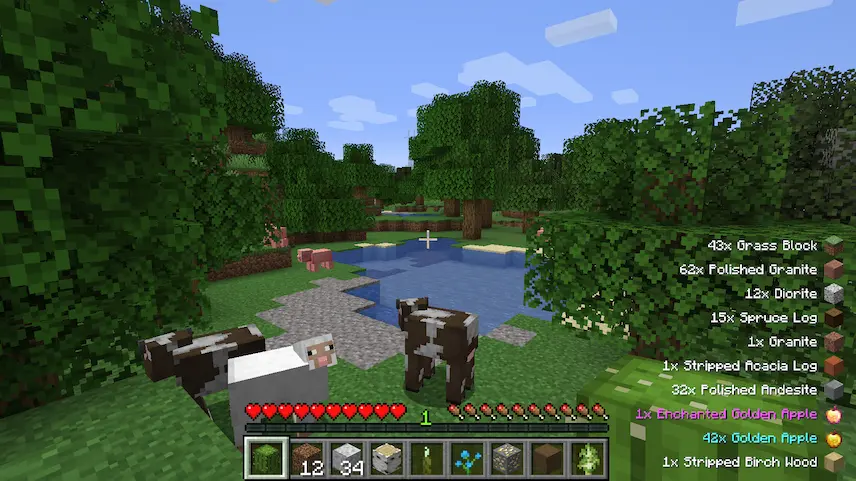
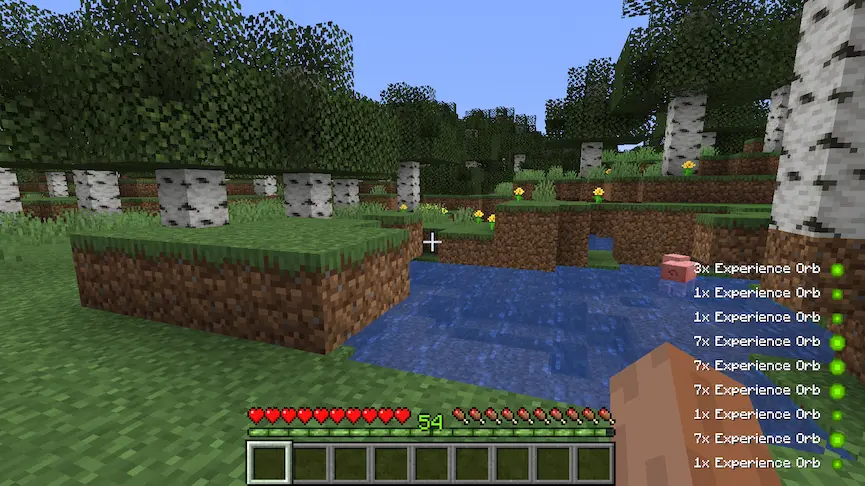
Pick Up Notifier is the ultimate quality-of-life mod for Minecraft players who hate losing track of their loot! Whenever you grab items, XP, or arrows, a sleek list pops up in the bottom-right corner, showing exactly what you’ve collected—perfect for chaotic mining sessions or mob battles. Outdated entries fade smoothly, but refresh if you pick up more of the same item. It even works with backpack mods and partial inventory pickups, so no drop goes unnoticed. Customize everything: position, text style, duration, and whether to merge similar items.
Fabric
- 1. Download, execute the Fabric installer, choose Client, select your Minecraft version, and click Install.
- 2. Download the Fabric API matching that Minecraft version.
- 3. Download Pick Up Notifier or any additional Fabric-compatible mods you want.
-
4.
Place the Fabric API and all mods into
.minecraft/modsfolder. - 5. Open the Minecraft Launcher, select the new Fabric profile, and press Play. Enjoy!
Forge
- 1. Download, execute the Forge installer, choose Client, and click Install.
- 3. Download Pick Up Notifier or any additional Forge-compatible mods you want.
-
4.
Place all mods into
.minecraft/modsfolder. - 5. Open the Minecraft Launcher, select the new Forge profile, and press Play. Enjoy!
NeoForge
- 1. Download, execute the NeoForge installer, choose Client, and click Install.
- 3. Download Pick Up Notifier or any additional NeoForge-compatible mods you want.
-
4.
Place all mods into
.minecraft/modsfolder. - 5. Open the Minecraft Launcher, select the new NeoForge profile, and press Play. Enjoy!
Download Pick Up Notifier Mod
| Type | Game version | File version | Loaders | Download |
|---|---|---|---|---|
|
R Release
|
1.21.11 | v21.11.0 |
Fabric
|
File |
|
R Release
|
1.21.11 | v21.11.0 |
NeoForge
|
File |
|
R Release
|
1.21.10 | v21.10.0 |
Fabric
|
File |
|
R Release
|
1.21.10 | v21.10.0 |
NeoForge
|
File |
|
R Release
|
1.21.8 | v21.8.1 |
Fabric
|
File |
|
R Release
|
1.21.8 | v21.8.1 |
NeoForge
|
File |
|
R Release
|
1.21.5 | v21.5.1 |
Fabric
|
File |
|
R Release
|
1.21.5 | v21.5.1 |
NeoForge
|
File |
|
R Release
|
1.21.4 | v21.4.0 |
Fabric
|
File |
|
R Release
|
1.21.4 | v21.4.0 |
NeoForge
|
File |
|
R Release
|
1.21.3 | v21.3.0 |
Fabric
|
File |
|
R Release
|
1.21.3 | v21.3.0 |
NeoForge
|
File |
|
R Release
|
1.21.1 | v21.1.1 |
Fabric
|
File |
|
R Release
|
1.21.1 | v21.1.1 |
NeoForge
|
File |
|
R Release
|
1.20.4 | v20.4.2 |
Fabric
|
File |
|
R Release
|
1.20.4 | v20.4.2 |
Forge
|
File |
|
R Release
|
1.20.4 | v20.4.2 |
NeoForge
|
File |
|
R Release
|
1.20.1 | v8.0.0 |
Fabric
|
File |
|
R Release
|
1.20.1 | v8.0.0 |
Forge
|
File |
|
R Release
|
1.19.4 | v6.0.0 |
Fabric
|
File |
|
R Release
|
1.19.4 | v6.0.0 |
Forge
|
File |
|
R Release
|
1.19.2 | v4.2.4 |
Fabric
|
File |
|
R Release
|
1.19.2 | v4.2.4 |
Forge
|
File |
|
R Release
|
1.18.2 | v3.2.1 |
Forge
|
File |
|
R Release
|
1.17.1 | v2.1.0 |
Forge
|
File |
|
R Release
|
1.16.5 | v1.2 |
Forge
|
File |
Tags
- # Minecraft 1.16.5 Mods
- # Minecraft 1.17.1 Mods
- # Minecraft 1.18.2 Mods
- # Minecraft 1.19.2 Mods
- # Minecraft 1.19.4 Mods
- # Minecraft 1.20.1 Mods
- # Minecraft 1.20.4 Mods
- # Minecraft 1.20.6 Mods
- # Minecraft 1.21.1 Mods
- # Minecraft 1.21.11 Mods
- # Minecraft 1.21.3 Mods
- # Minecraft 1.21.4 Mods
- # Minecraft 1.21.5 Mods
- # Minecraft 1.21.8 Mods