logo responsive
/

Health Bars Minecraft Mod

26.2, 26.1.2, 1.21.11

Health Bars hud
Health Bars
hud

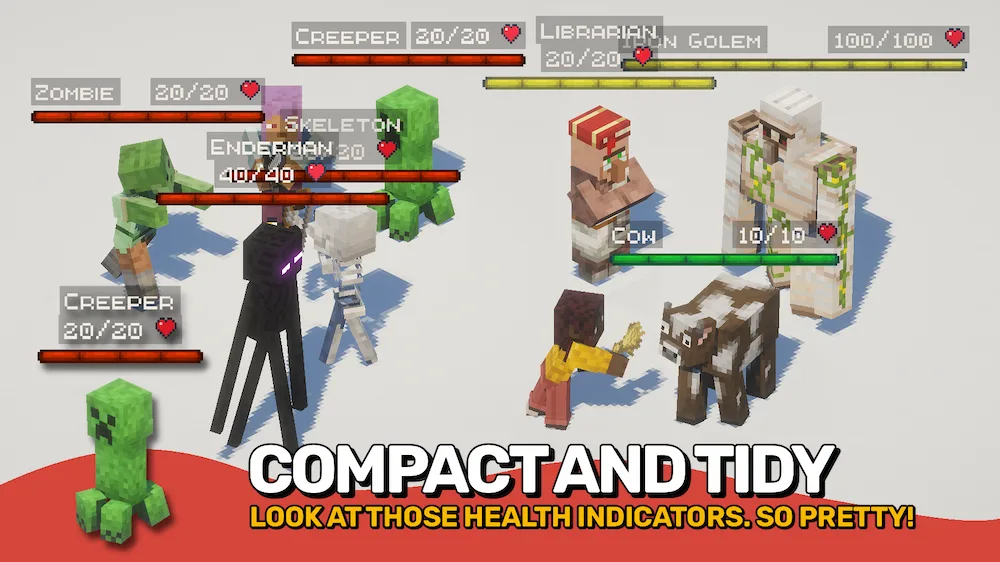
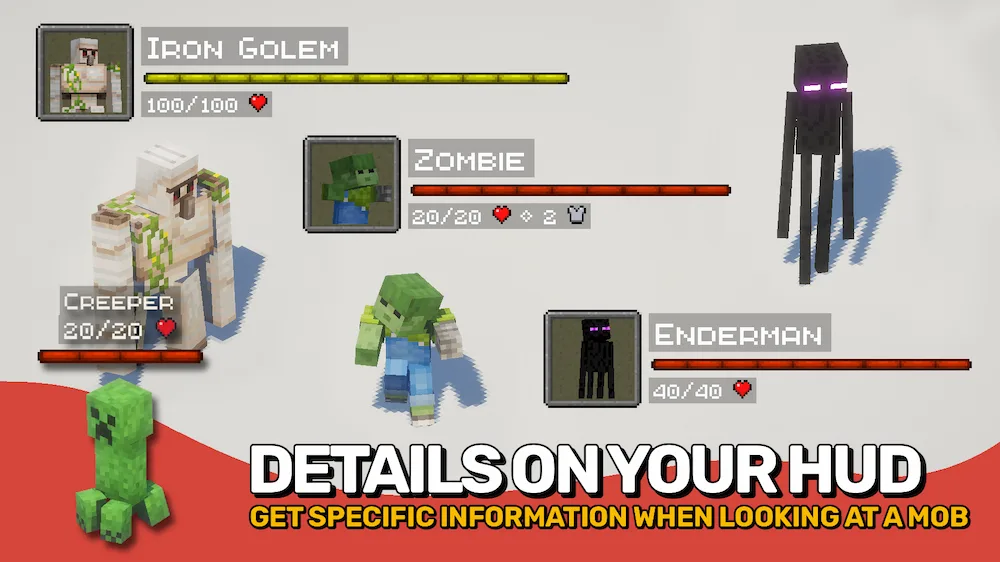
The Health Bars mod is a total life-saver if you are tired of guessing how much HP a boss has left during a crazy fight. It adds super smooth and colorful displays for every mob in your world, showing their name, health, and even their armor bars right on your screen. You get to see live damage numbers floating around whenever you land a hit, which makes combat feel way more like a modern RPG. Whether you are hunting standard zombies or facing off against a massive modded dragon, the bars scale perfectly so you always know exactly what you are up against.

What is really cool is how much you can customize the look to fit your style. You can have the health bars pop up in the corner of your HUD or floating directly above the mobs for a more immersive feel. You can even set custom colors for different types of creatures, like red for monsters and green for friendly animals, so you can tell them apart at a glance. It works perfectly with both vanilla and modded entities, and it is optimized to stay crisp and easy to read even from a distance. It is a must-have for any adventure or combat-focused pack where you want that extra bit of tactical info.


Fabric

  1. 1. Download, execute the Fabric installer, choose Client, select your Minecraft version, and click Install.
  2. 2. Download the Fabric API matching that Minecraft version.
  3. 3. Download Health Bars or any additional Fabric-compatible mods you want.
  4. 4. Place the Fabric API and all mods into .minecraft/mods folder.
  5. 5. Open the Minecraft Launcher, select the new Fabric profile, and press Play. Enjoy!

Forge

  1. 1. Download, execute the Forge installer, choose Client, and click Install.
  2. 3. Download Health Bars or any additional Forge-compatible mods you want.
  3. 4. Place all mods into .minecraft/mods folder.
  4. 5. Open the Minecraft Launcher, select the new Forge profile, and press Play. Enjoy!

NeoForge

  1. 1. Download, execute the NeoForge installer, choose Client, and click Install.
  2. 3. Download Health Bars or any additional NeoForge-compatible mods you want.
  3. 4. Place all mods into .minecraft/mods folder.
  4. 5. Open the Minecraft Launcher, select the new NeoForge profile, and press Play. Enjoy!

Download Health Bars Mod

Type Game version File version Loaders Download
R Release
26.2 v26.2.0
Fabric
File
R Release
26.2 v26.2.0
NeoForge
File
R Release
26.1.x v26.1.1
Fabric
File
R Release
26.1.x v26.1.1
NeoForge
File
R Release
1.21.11 v21.11.0
Fabric
File
R Release
1.21.11 v21.11.0
NeoForge
File
R Release
1.21.10 v21.10.0
Fabric
File
R Release
1.21.10 v21.10.0
NeoForge
File
R Release
1.21.8 v21.8.0
Fabric
File
R Release
1.21.8 v21.8.0
NeoForge
File
R Release
1.21.5 v21.5.0
Fabric
File
R Release
1.21.5 v21.5.0
NeoForge
File
R Release
1.21.4 v21.4.0
Fabric
File
R Release
1.21.4 v21.4.0
NeoForge
File
R Release
1.21.1 v21.1.0
Fabric
File
R Release
1.21.1 v21.1.0
NeoForge
File

Health Bars Minecraft Mod

16 files • 26.2, 26.1.2, 1.21.11

Download