logo responsive
/

Tectonic Minecraft Mod

26.2, 26.1.2, 1.21.11, 1.20.6, 1.19.4, 1.18.2, 1.16.5

banner

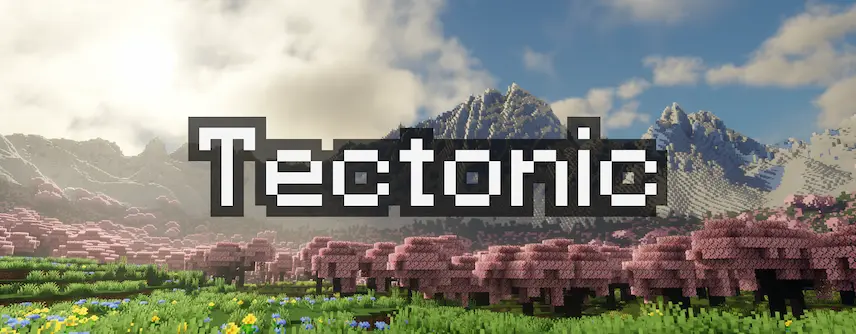
Tectonic is a revolutionary Minecraft world generation mod that transforms your terrain into breathtaking landscapes with massive mountain ranges and dynamic geology. Available as both a datapack and a Fabric/Neoforge mod*, Tectonic redefines how terrain is shaped in Minecraft, offering huge, sprawling mountain ranges that stretch for thousands of blocks and even soar above y300. For users looking to achieve a seamless modded experience, note that if you’re using Terralith alongside Tectonic as datapacks, you should install Terratonic instead. This ensures full compatibility and optimized performance for your worlds—making it the perfect choice for those seeking immersive and truly unique Minecraft map creation.

Designed with flexibility in mind, Tectonic empowers players with several tweakable features that can be easily toggled via the mod version’s config file, allowing you to customize your world generation to fit your creative vision. Whether you’re a seasoned Minecraft adventurer or a new player eager to explore vibrant, meticulously crafted terrains, Tectonic’s impactful changes to worldgen offer a fresh way to experience your games. Elevate your Minecraft landscapes today by discovering Tectonic—your gateway to innovative Minecraft terrain generation that effortlessly meshes with popular mods and enhances your overall gameplay experience.


Fabric

  1. 1. Download, execute the Fabric installer, choose Client, select your Minecraft version, and click Install.
  2. 2. Download the Fabric API matching that Minecraft version.
  3. 3. Download Tectonic or any additional Fabric-compatible mods you want.
  4. 4. Place the Fabric API and all mods into .minecraft/mods folder.
  5. 5. Open the Minecraft Launcher, select the new Fabric profile, and press Play. Enjoy!

Forge

  1. 1. Download, execute the Forge installer, choose Client, and click Install.
  2. 3. Download Tectonic or any additional Forge-compatible mods you want.
  3. 4. Place all mods into .minecraft/mods folder.
  4. 5. Open the Minecraft Launcher, select the new Forge profile, and press Play. Enjoy!

NeoForge

  1. 1. Download, execute the NeoForge installer, choose Client, and click Install.
  2. 3. Download Tectonic or any additional NeoForge-compatible mods you want.
  3. 4. Place all mods into .minecraft/mods folder.
  4. 5. Open the Minecraft Launcher, select the new NeoForge profile, and press Play. Enjoy!

Download Tectonic Mod

Type Game version File version Loaders Download
R Release
26.2 v3.0.26
Fabric
File
R Release
26.2 v3.0.26
NeoForge
File
R Release
26.1.x v3.0.26
Fabric
File
R Release
26.1.x v3.0.26
NeoForge
File
R Release
1.21.11 v3.0.19
Fabric
File
R Release
1.21.11 v3.0.19
NeoForge
File
R Release
1.21.10 v3.0.17
Fabric
File
R Release
1.21.10 v3.0.17
NeoForge
File
R Release
1.21.8 v3.0.13
Fabric
File
R Release
1.21.8 v3.0.13
NeoForge
File
B Beta
1.21.5 v3.0.1
Fabric
File
B Beta
1.21.5 v3.0.1
NeoForge
File
R Release
1.21.4 v2.4.3
Fabric
File
R Release
1.21.4 v2.4.3
NeoForge
File
R Release
1.21.3 v2.4.2
Fabric
File
R Release
1.21.3 v2.4.2
NeoForge
File
R Release
1.21.1 v3.0.19
Fabric
File
R Release
1.21.1 v3.0.19
NeoForge
File
R Release
1.20.6 v2.3.5
Fabric
File
R Release
1.20.6 v2.3.5
NeoForge
File
R Release
1.20.4 v2.3.5
Fabric
File
R Release
1.20.4 v2.3.5
Forge
File
R Release
1.20.4 v2.3.4
NeoForge
File
R Release
1.20.1 v3.0.17
Fabric
File
R Release
1.20.1 v3.0.17
Forge
File
R Release
1.19.4 v2.3.5
Fabric
File
R Release
1.19.4 v2.3.5
Forge
File
R Release
1.19.2 v2.3.5
Fabric
File
R Release
1.19.2 v2.3.5
Forge
File
R Release
1.18.2 v2.3.5
Fabric
File
R Release
1.18.2 v2.3.5
Forge
File

Tectonic Minecraft Mod

31 files • 26.2, 26.1.2, 1.21.11, 1.20.6, 1.19.4, 1.18.2, 1.16.5

Download