logo responsive
/

Trinkets Minecraft Mod

1.21.1, 1.20.6, 1.19.4, 1.18.2, 1.16.5

extra slots

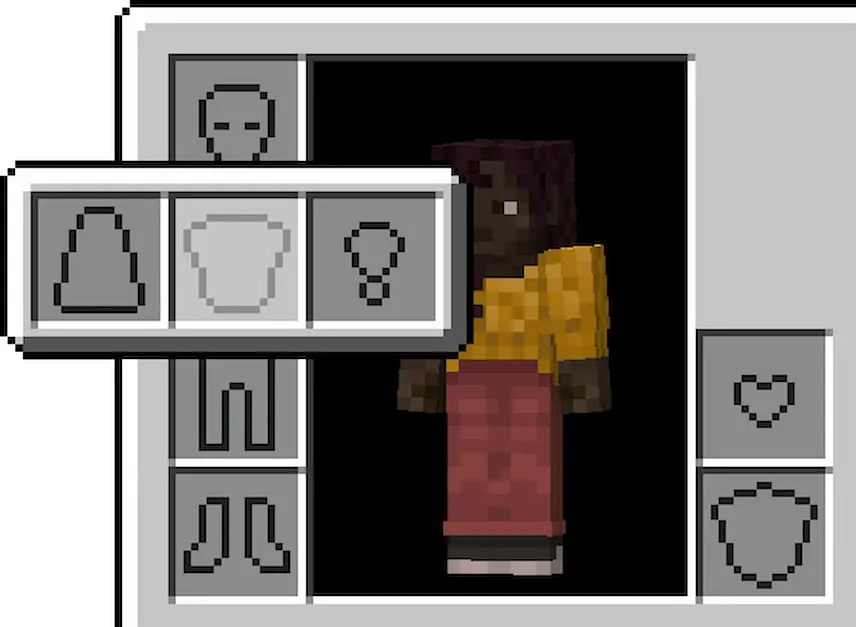
Trinkets is a Minecraft mod that introduces a flexible slot system for equipment and accessories. Instead of being limited to the standard armor and offhand slots, Trinkets lets you add custom slot groups for body parts like head, chest, legs, and feet, as well as slots for hands or offhand items. Each mod you install can request the exact slots it needs, so you never see empty or unused equipment spaces. This approach keeps your inventory clean and makes it easy to manage all your rings, amulets, charms, and other small items without clutter.

The mod’s user interface blends seamlessly with Minecraft’s existing menus, offering an intuitive layout that shows only the slots you actually use. You can quickly swap accessories in and out to fine tune your character’s abilities, whether you are boosting speed, improving defense, or adding special effects. Thanks to its open design, Trinkets works well with many other mods and lets you expand slot groups or create new ones as needed. By simplifying how you equip extra gear, this Minecraft mod enhances gameplay and lets you focus on exploration, combat, and building without worrying about inventory overload.

Fabric

  1. 1. Download, execute the Fabric installer, choose Client, select your Minecraft version, and click Install.
  2. 2. Download the Fabric API matching that Minecraft version.
  3. 3. Download Trinkets or any additional Fabric-compatible mods you want.
  4. 4. Place the Fabric API and all mods into .minecraft/mods folder.
  5. 5. Open the Minecraft Launcher, select the new Fabric profile, and press Play. Enjoy!

Forge

  1. 1. Download, execute the Forge installer, choose Client, and click Install.
  2. 3. Download Trinkets or any additional Forge-compatible mods you want.
  3. 4. Place all mods into .minecraft/mods folder.
  4. 5. Open the Minecraft Launcher, select the new Forge profile, and press Play. Enjoy!

NeoForge

  1. 1. Download, execute the NeoForge installer, choose Client, and click Install.
  2. 3. Download Trinkets or any additional NeoForge-compatible mods you want.
  3. 4. Place all mods into .minecraft/mods folder.
  4. 5. Open the Minecraft Launcher, select the new NeoForge profile, and press Play. Enjoy!

Download Trinkets Mod

Type Game version File version Loaders Download
R Release
1.21.1 v3.10.0
Fabric
File
R Release
1.20.6 v3.9.0
Fabric
File
R Release
1.20.4 v3.8.1
Fabric
File
R Release
1.20.1 v3.7.2
Fabric
File
R Release
1.19.4 v3.6.0
Fabric
File
R Release
1.19.2 3.4.2
Fabric
File
R Release
1.18.2 v3.3.1
Fabric
File
R Release
1.17.1 v3.0.4
Fabric
File
R Release
1.16.5 v2.6.7
Fabric
File

Trinkets Minecraft Mod

9 files • 1.21.1, 1.20.6, 1.19.4, 1.18.2, 1.16.5

Download