logo responsive
/

Amendments Minecraft Mod

1.21.1, 1.20.1

cosmetics

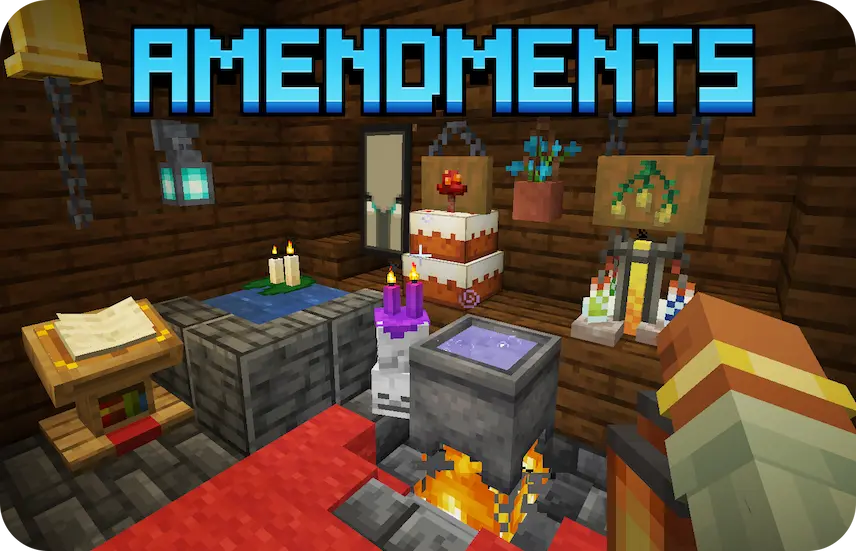
Amendments is a Minecraft mod that brings a suite of configurable tweaks to existing vanilla blocks, giving them more functionality and polish without introducing entirely new items. By merging features from previously separate mods like Carpeted Stairs, Better Lilypads, Better Jukeboxes, and select Supplementaries additions, it streamlines your mod list—no need to install those extras separately anymore. Whether you’re rearranging stairs with patterned carpets or placing lily pads that actually improve water traversal, Amendments subtly enhances everyday building and exploration.

Among its standout improvements is cauldron potion mixing, which lets you combine and fill potions directly in a cauldron instead of relying on brewing stands alone. Wall lanterns now sit flush against vertical surfaces, and a new lantern holding animation adds visual flair when you carry one by hand. Decorating caves or shrines feels more atmospheric with Skull Piles and Candle Skulls, and the Better Lectern GUI offers a cleaner, more intuitive interface for reading and editing books. By focusing on revitalizing vanilla features, this Minecraft mod makes your world look sharper and function more smoothly without disrupting the core gameplay experience.


Fabric

  1. 1. Download, execute the Fabric installer, choose Client, select your Minecraft version, and click Install.
  2. 2. Download the Fabric API matching that Minecraft version.
  3. 3. Download Amendments or any additional Fabric-compatible mods you want.
  4. 4. Place the Fabric API and all mods into .minecraft/mods folder.
  5. 5. Open the Minecraft Launcher, select the new Fabric profile, and press Play. Enjoy!

Forge

  1. 1. Download, execute the Forge installer, choose Client, and click Install.
  2. 3. Download Amendments or any additional Forge-compatible mods you want.
  3. 4. Place all mods into .minecraft/mods folder.
  4. 5. Open the Minecraft Launcher, select the new Forge profile, and press Play. Enjoy!

NeoForge

  1. 1. Download, execute the NeoForge installer, choose Client, and click Install.
  2. 3. Download Amendments or any additional NeoForge-compatible mods you want.
  3. 4. Place all mods into .minecraft/mods folder.
  4. 5. Open the Minecraft Launcher, select the new NeoForge profile, and press Play. Enjoy!

Download Amendments Mod

Type Game version File version Loaders Download
R Release
1.21.1 v1.2.24
Fabric
File
R Release
1.21.1 v1.2.24
NeoForge
File
R Release
1.20.1 v1.2.19
Fabric
File
R Release
1.20.1 v1.2.19
Forge
File

Amendments Minecraft Mod

4 files • 1.21.1, 1.20.1

Download