logo responsive
/

AppleSkin Minecraft Mod

26.2, 26.1.2, 1.21.11, 1.20.6, 1.19.4, 1.18.2, 1.17.1, 1.16.5

AppleSkin is a handy client-side mod that enhances your Minecraft HUD with detailed food-related information. It doesn’t change any game mechanics but makes hidden features, like saturation and exhaustion, more visible. With AppleSkin, you can view food values in tooltips, track hunger and saturation restoration while holding food, and even see potential health recovery. It also adds hunger stats to the debug overlay for a better understanding of Minecraft’s mechanics.

Although primarily client-side, AppleSkin needs to be installed on the server for accurate synchronization of saturation and exhaustion values.

Features

  • Displays detailed food value information in item tooltips:

food value information

  • Shows a visual representation of saturation and exhaustion directly on the HUD:
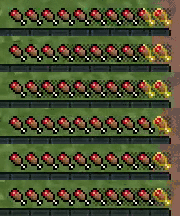
saturation

  • Highlights the potential hunger and saturation recovery when holding food items:

saturation recovery

  • Indicates the potential health regeneration from consuming food:

health regeneration

  • Adds hunger, saturation, and exhaustion details to the debug screen (F3).
  • Synchronizes saturation and exhaustion stats between the server and client.

Fabric

  1. 1. Download, execute the Fabric installer, choose Client, select your Minecraft version, and click Install.
  2. 2. Download the Fabric API matching that Minecraft version.
  3. 3. Download AppleSkin or any additional Fabric-compatible mods you want.
  4. 4. Place the Fabric API and all mods into .minecraft/mods folder.
  5. 5. Open the Minecraft Launcher, select the new Fabric profile, and press Play. Enjoy!

Forge

  1. 1. Download, execute the Forge installer, choose Client, and click Install.
  2. 3. Download AppleSkin or any additional Forge-compatible mods you want.
  3. 4. Place all mods into .minecraft/mods folder.
  4. 5. Open the Minecraft Launcher, select the new Forge profile, and press Play. Enjoy!

NeoForge

  1. 1. Download, execute the NeoForge installer, choose Client, and click Install.
  2. 3. Download AppleSkin or any additional NeoForge-compatible mods you want.
  3. 4. Place all mods into .minecraft/mods folder.
  4. 5. Open the Minecraft Launcher, select the new NeoForge profile, and press Play. Enjoy!

Download AppleSkin Mod

Type Game version File version Loaders Download
R Release
26.2 v3.0.10
Fabric
File
R Release
26.2 v3.0.10
NeoForge
File
B Beta
26.1.x v3.0.10
Fabric
File
R Release
26.1.x v3.0.9
NeoForge
File
B Beta
1.21.11 v3.0.8
Fabric
File
R Release
1.21.11 v3.0.8
NeoForge
File
B Beta
1.21.10 v3.0.7
Fabric
File
R Release
1.21.10 v3.0.7
NeoForge
File
B Beta
1.21.9 v3.0.7
Fabric
File
R Release
1.21.9 v3.0.7
NeoForge
File
B Beta
1.21.8 v3.0.7
Fabric
File
R Release
1.21.8 v3.0.7
NeoForge
File
B Beta
1.21.7 v3.0.7
Fabric
File
R Release
1.21.7 v3.0.7
NeoForge
File
B Beta
1.21.6 v3.0.7
Fabric
File
R Release
1.21.6 v3.0.7
NeoForge
File
B Beta
1.21.5 v3.0.6
Fabric
File
R Release
1.21.5 v3.0.6
NeoForge
File
B Beta
1.21.4 v3.0.6
Fabric
File
R Release
1.21.4 v3.0.6
NeoForge
File
B Beta
1.21.3 v3.0.6
Fabric
File
R Release
1.21.3 v3.0.6
NeoForge
File
B Beta
1.21.1 v3.0.6
Fabric
File
R Release
1.21.1 v3.0.9
NeoForge
File
B Beta
1.20.6 v3.0.5
Fabric
File
R Release
1.20.6 v3.0.5
NeoForge
File
B Beta
1.20.4 v2.5.1
Fabric
File
R Release
1.20.4 v2.5.1
Forge
File
R Release
1.20.4 v2.5.1
NeoForge
File
B Beta
1.20.1 v2.5.1
Fabric
File
R Release
1.20.1 v2.5.2
Forge
File
B Beta
1.19.4 v2.5.1
Fabric
File
R Release
1.19.4 v2.5.1
Forge
File
B Beta
1.19.2 v2.5.1
Fabric
File
R Release
1.19.2 v2.4.2
Forge
File
B Beta
1.18.2 v2.5.1
Fabric
File
R Release
1.18.2 v2.5.1
Forge
File
B Beta
1.17.1 v2.5.1
Fabric
File
R Release
1.17.1 v2.5.1
Forge
File
B Beta
1.16.5 v2.5.1
Fabric
File
R Release
1.16.5 v2.5.1
Forge
File

AppleSkin Minecraft Mod

41 files • 26.2, 26.1.2, 1.21.11, 1.20.6, 1.19.4, 1.18.2, 1.17.1, 1.16.5

Download