logo responsive
/

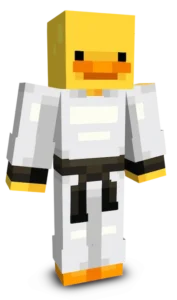
Chef Duck Minecraft Skin

Chef Duck is a charming Minecraft skin that combines the lovable look of a classic duck with the style of a professional chef. Featuring a crisp white chef’s hat, a matching vest, and clean details throughout the outfit, this character is ready to take charge of any kitchen, bakery, or restaurant build. The cheerful design gives the skin plenty of personality while maintaining a simple and recognizable appearance.

Perfect for roleplay servers, food-themed adventures, or casual survival worlds, Chef Duck adds a fun and lighthearted touch to your Minecraft experience. Whether you are serving meals to friends, running a restaurant, or simply looking for a unique and cute character, this skin stands out with its playful combination of culinary style and duck-inspired charm. If you enjoy creative, funny, and wholesome Minecraft skins, Chef Duck is a great addition to your collection.
To change your character's skin in Minecraft Java Edition, follow these steps:

  • Open your web browser and go to the official Minecraft website: https://www.minecraft.net/.
  • Log in with your Minecraft account if you haven't already.
  • At the top of the website, you will see the "Skins" option. Click on it.
  • Here, you can choose from several options:
    • New Skin: Upload a custom skin from your computer.
    • Change to Steve: Change your skin to the default Steve appearance.
    • Change to Alex: Change your skin to the default Alex appearance.
    • Browse Skins: Explore and select a skin from Minecraft's official gallery.
  • If you choose "New Skin," select the image file of your new skin from your computer. The skin should be in PNG format and follow the appropriate dimensions.
  • After selecting or uploading the skin, click the "Upload" or "Change My Skin" button to apply the new skin to your character.
  • Open the Minecraft game and check that the new skin has been applied correctly.